

Best Rendering Software for Interior Design in 2026: A Two-Phase Answer
This post covers the four tools that define the current best rendering software for interior design landscape, explains which workflow stage each belongs to, and maps the Chaos ecosystem connection that makes Enscape and V-Ray work as a unified pipeline.
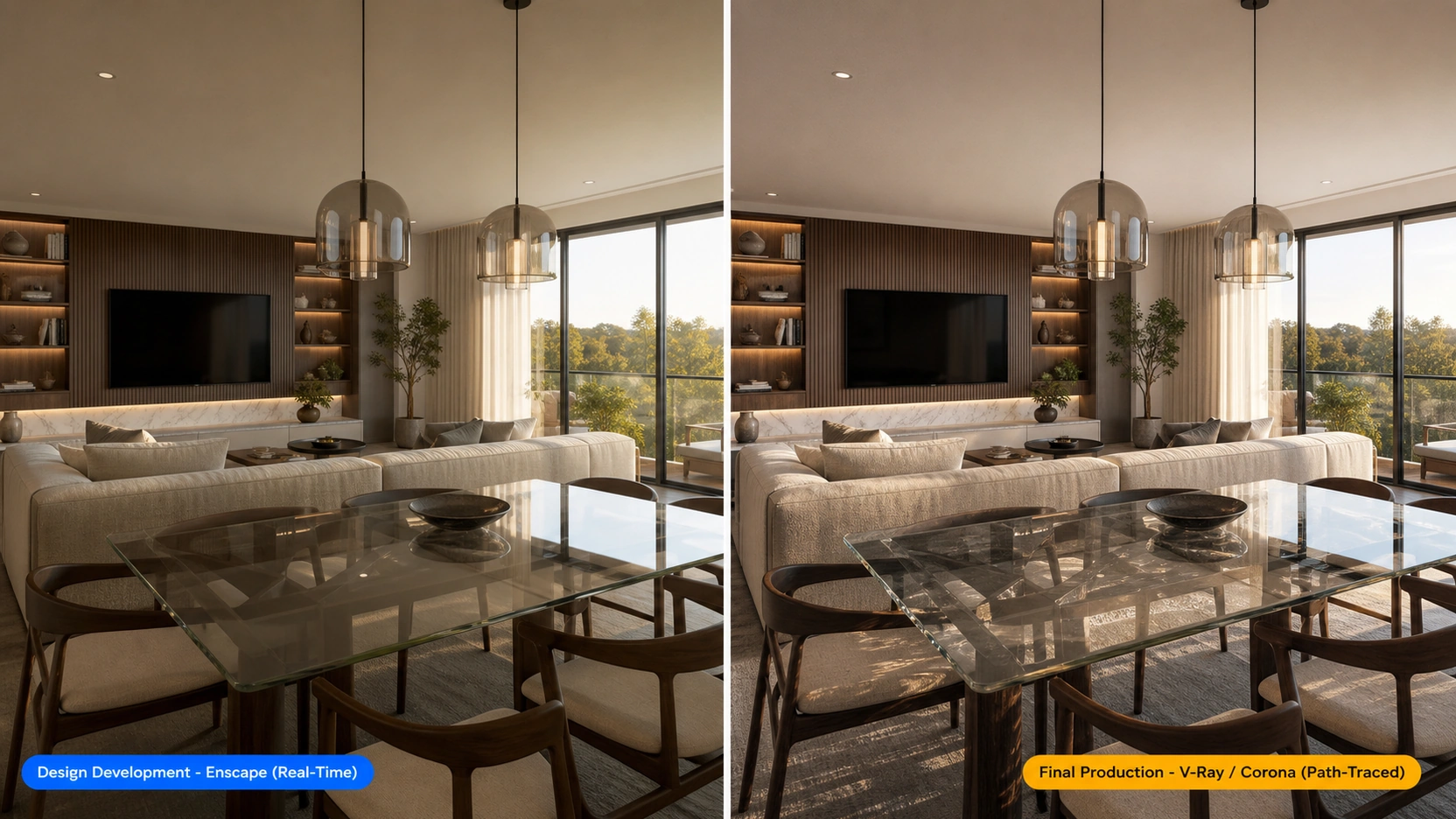
The Two-Phase Framework
Phase 1 : Design Development: Real-Time Rendering
Design development is the phase where layouts change, materials are tested, lighting scenarios are adjusted, and client feedback drives iteration. The priority is speed of feedback, not output perfection. A design team needs to evaluate 10 material combinations in an afternoon, not wait for a 45-minute render per option.
Real-time rendering software for interior design gives immediate visual feedback: change a wall colour in SketchUp, see it reflected in the renderer within a second. Show a live walkthrough in a client meeting. Export a quick image for team review without a render queue.
The best real-time rendering software for interior design: Enscape (BIM-integrated practices), Lumion (atmospheric animation), D5 Render (near-production quality at real-time speed).
Phase 2 : Final Production: Path-Traced Rendering
Final production is the phase where the design is locked and the deliverable is a photorealistic still or video for marketing, portfolio, competition entry, or client approval. The priority is output quality: physically accurate light behaviour, correct material response, precise shadow rendering.
Path-traced rendering software for interior design produces this output at the cost of render time (minutes to hours per frame) and setup complexity. The tradeoff is worth it when the output is the primary deliverable, not a review tool.
The best path-traced rendering software for interior design: Corona Renderer (3ds Max primary, best interior material response), V-Ray (cross-platform, widest plugin ecosystem, Chaos Bridge for Enscape handoff).
The Four Tools
Enscape : Best Real-Time Rendering Software for Interior Design (BIM-Integrated Practices)
Enscape is a plugin-based real-time renderer that runs inside SketchUp, Revit, Rhino, ArchiCAD, and Vectorworks without requiring an export or scene rebuild. A design change in the CAD host appears in Enscape’s viewport immediately — the live-sync is Enscape’s defining technical feature.
For interior designers working in Revit or SketchUp, Enscape is the most efficient way to integrate visualization into the design workflow. The learning curve is measured in hours, not weeks. Basic photorealistic interior output is achievable within the first day of use.
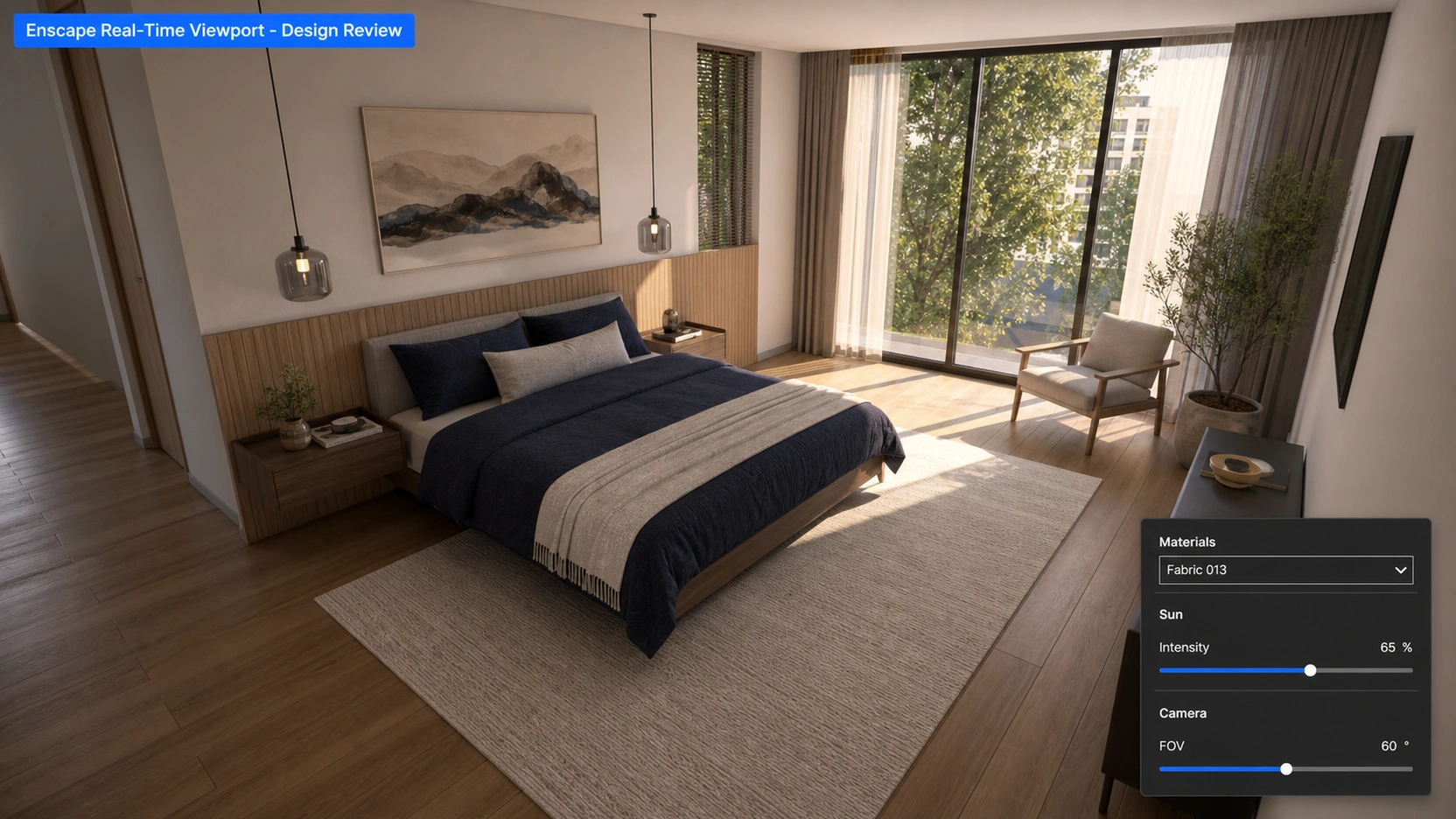
Enscape’s output quality is high enough for client presentation in most residential and commercial interior design contexts. At close inspection, real-time light falloff is less precise than path tracing, and complex fabric or reflective surface layering does not reach production renderer accuracy.
Pricing: $499 to $1,199/year depending on the CAD host license. Owned by Chaos Group.
V-Ray : Best Cross-Platform Production Rendering Software for Interior Design
V-Ray is the longest-standing production rendering standard in professional archviz. It runs as a plugin across 3ds Max, SketchUp, Revit, Cinema 4D, Rhino, Maya, and Unreal Engine — the widest host application ecosystem of any production renderer.
For interior design studios using SketchUp or Revit as their primary CAD host, V-Ray is available without switching to a new application. This cross-platform compatibility is V-Ray’s primary competitive advantage over Corona.
The Chaos Bridge allows an Enscape scene — materials, lighting setup, camera positions — to be transferred directly into V-Ray for final rendering, without rebuilding the scene from scratch. Studios can do all design development in Enscape and switch to V-Ray for the final hero image using the same scene data.
Pricing: $700+/year (V-Ray Solo). Owned by Chaos Group (same parent company as Enscape).
Corona Renderer : Best Path-Traced Rendering Software for Interior Design (3ds Max Pipeline)
Corona Renderer is the production rendering software that most interior visualization specialists choose when given a free decision, specifically for interior work. Its default material response requires less manual calibration than V-Ray to produce natural-looking results in the most common interior rendering scenario: warm artificial light mixed with window daylight, bouncing through fabric, timber, and stone.
A Corona material setup for a living room with complex mixed lighting, built by a competent artist, tends to produce photorealistic output faster than a V-Ray material setup for the same scene, because Corona’s default GI settings and material response are calibrated toward interior scenes. V-Ray provides more control — which is an advantage for complex or unconventional lighting setups, but slower for standard interior work.
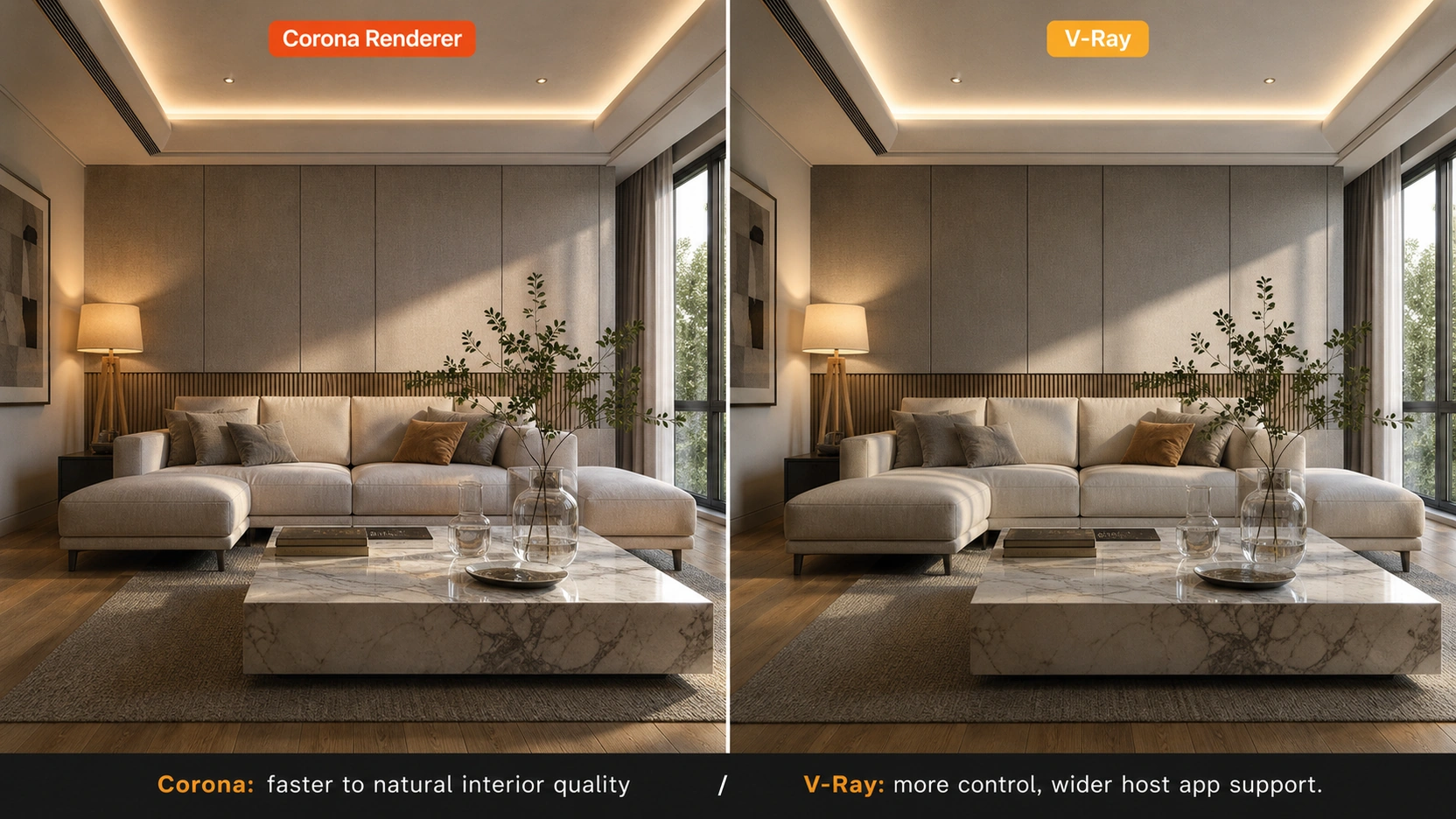
Pricing: Part of the Chaos subscription ecosystem. Windows only.
For a detailed comparison of how V-Ray and Corona handle material setup and render times for interior projects, see our post on interior design rendering software: V-Ray vs Corona.
Lumion : Best for Interior Design Cinematic Animation
Lumion is the best rendering software for interior design cinematic walkthroughs and atmospheric marketing animation. Its large built-in asset library (furniture, vegetation, people, vehicles), fast animation output, and distinctive warm post-processing make it the dominant tool for producing “beautiful, fast” marketing videos from interior scenes.
Lumion is not the best tool for final photorealistic stills where material accuracy and precise light physics are the priority. The “Lumion aesthetic” – warm atmospheric post-processing, stylised sky rendering, softened shadow transitions is recognizable to experienced archviz observers. Right tool for emotional impact and speed; not the right tool for photorealistic precision.
Pricing: Annual subscription, Windows only. No free tier for professional use.
D5 Render : Emerging Option: Near-Production Quality at Real-Time Speed
D5 Render is a standalone real-time renderer with GPU path tracing, a growing built-in asset library, and geometry-aware AI spatial upscaling. It occupies the space between Enscape (lighter, BIM-integrated, faster) and full production renderers (heavier, higher quality, longer setup). For studios that want production-quality output without the full V-Ray or 3ds Max pipeline, D5 Render is a viable and growing option in 2026.
The Chaos Ecosystem: Enscape + V-Ray
The most important development in rendering software for interior design in 2026 is Chaos Group’s ownership of both Enscape and V-Ray. The two tools are now designed to work as stages in a unified pipeline rather than competing alternatives.
The recommended dual-engine workflow for interior design studios:
- Design development in Enscape: live-sync with SketchUp, Revit, or Rhino. Real-time material testing, lighting scenario exploration, client walkthroughs. Learning curve in hours.
- Final production via Chaos Bridge to V-Ray: scene transfer from Enscape to V-Ray. Materials and lighting convert. V-Ray path tracing produces the final hero image at full photorealistic quality — without rebuilding the scene from scratch.
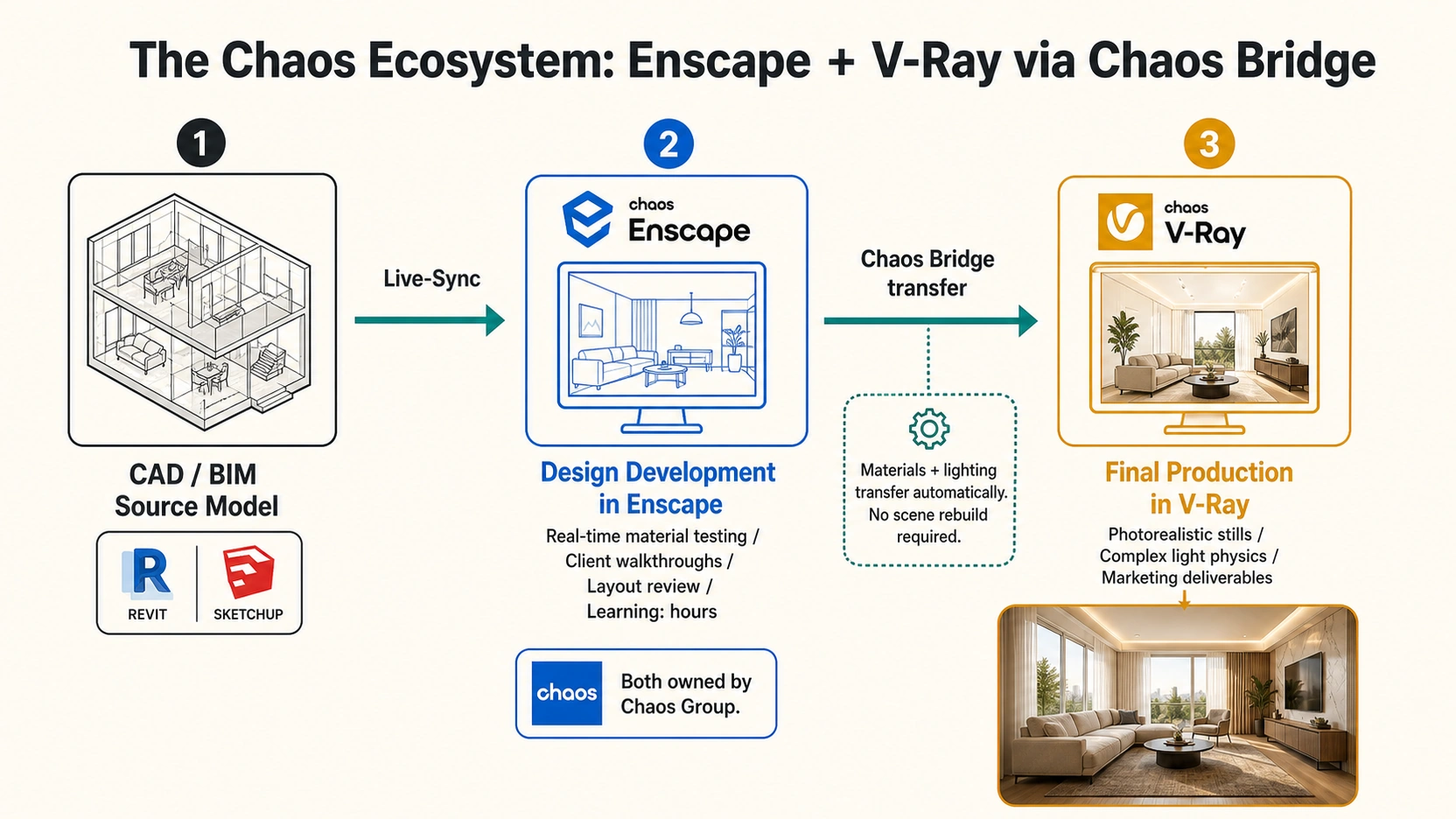
This workflow eliminates the traditional choice between iteration speed and output quality, a studio can have both by using the right tool at the right project stage.
Choosing by Workflow Type
| Workflow Type | Best Tool | Reason |
|---|---|---|
| BIM-integrated design reviews (Revit/SketchUp) | Enscape | Live-sync plugin, hours to learn, client-ready output |
| Final marketing stills (3ds Max pipeline) | Corona Renderer | Best interior material response, fastest to production quality |
| Final marketing stills (SketchUp/Revit pipeline) | V-Ray | Cross-platform, Chaos Bridge handoff from Enscape |
| Cinematic animation and walkthrough | Lumion | Fastest animation output, large asset library, atmospheric quality |
| Production quality without full pipeline setup | D5 Render | GPU path tracing, AI upscaling, standalone |
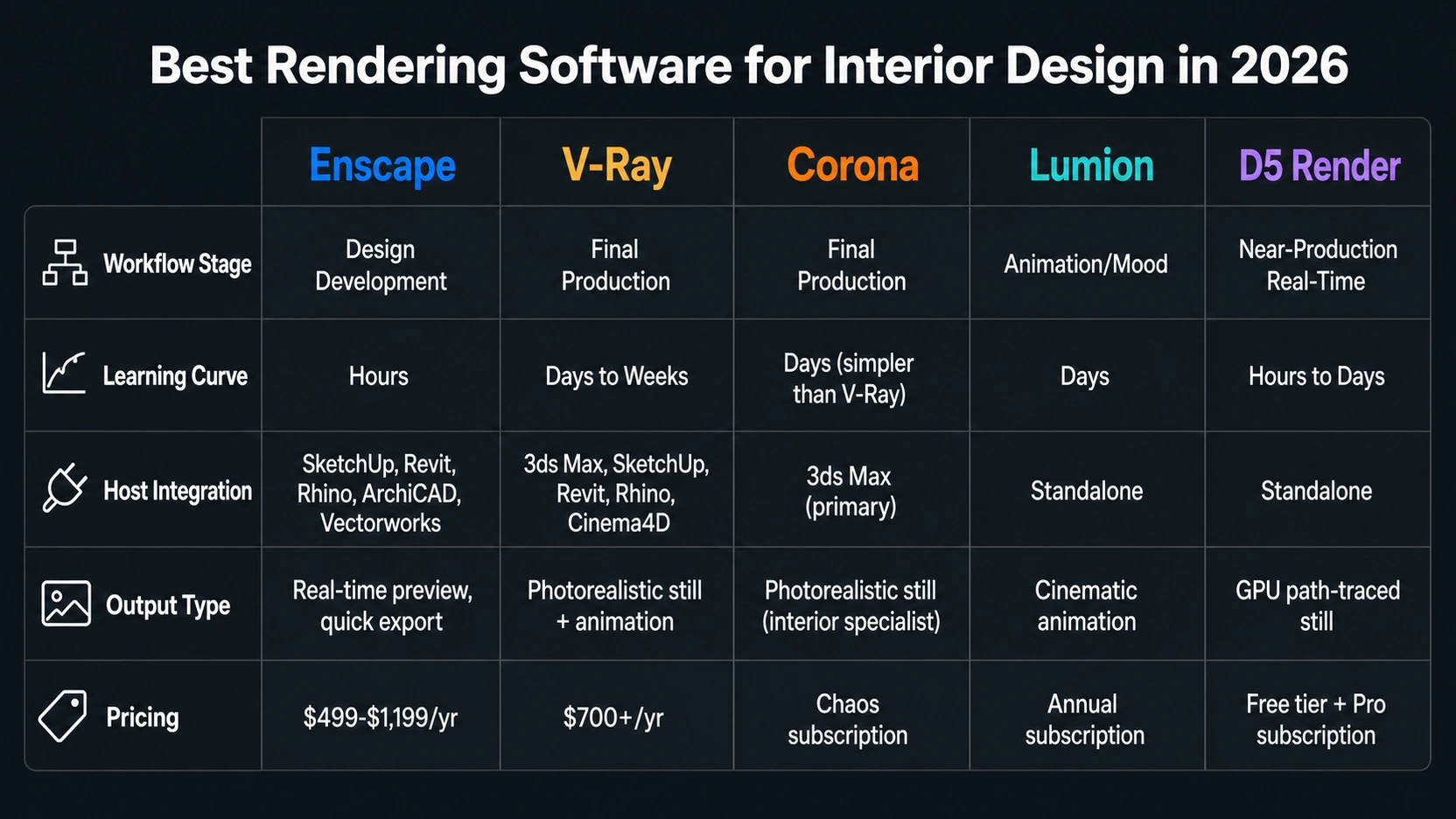
For production interior rendering output from your project files, see our interior rendering services page. For hardware requirements covering the above pipeline, see our guide on 3D rendering software for interior design: Mac vs PC.
At RenderInfinity, the production interior rendering pipeline uses 3ds Max and Corona on Windows workstations with NVIDIA RTX hardware for final marketing stills, with Enscape used for design review stages. This is the dual-engine workflow in practice.
Key Takeaways
- The best rendering software for interior design is a two-tool answer: a real-time renderer for design development (Enscape, Lumion, D5 Render) and a path-traced renderer for final production (Corona, V-Ray). Professional studios use both.
- Enscape: best real-time rendering software for interior design in BIM-integrated practices (Revit, SketchUp, Rhino). Live-sync with CAD, hours to learn, $499-$1,199/year, owned by Chaos Group.
- Corona Renderer: production rendering choice for interior visualization specialists on 3ds Max. Fastest path to photorealistic interior lighting quality simpler material calibration than V-Ray for standard interior scenes.
- V-Ray: cross-platform production standard (SketchUp, Revit, Rhino, Cinema 4D, 3ds Max). Chaos Bridge allows Enscape scene transfer to V-Ray for final rendering without scene rebuild.
- Enscape and V-Ray are both owned by Chaos Group. The Chaos Bridge – scene transfer from Enscape to V-Ray is the defining workflow development for interior design rendering in 2026.
- Lumion: best for cinematic animation, emotional atmosphere, large asset library. Windows-only. Recognizable post-processing aesthetic. Not suitable as primary path-traced production renderer for precise marketing stills.
Frequently Asked Questions
What is the best rendering software for interior design in 2026?
The best rendering software for interior design depends on workflow stage. For design development and client review, Enscape is the leading choice for BIM-integrated practices (SketchUp, Revit, Rhino) — it live-syncs with the CAD host, has a learning curve in hours, and produces client-ready output. For final photorealistic marketing stills, Corona Renderer (3ds Max) or V-Ray (cross-platform) are the production standards. Most professional studios use both: Enscape during design development, V-Ray or Corona for final output.
What is the difference between Enscape and V-Ray for interior design?
Enscape is a real-time renderer providing instant visual feedback as design changes are made in the CAD host. V-Ray is a path-traced production renderer that calculates physically accurate light physics for marketing-quality output. Enscape is faster but less precise. V-Ray produces superior quality for hero images but requires more setup time. Both are now owned by Chaos Group and work together via Chaos Bridge: scenes built in Enscape transfer to V-Ray for final rendering without rebuilding materials and lighting.
Is Corona or V-Ray better for interior design rendering?
For 3ds Max users, Corona is typically the faster path to photorealistic interior rendering quality. Its default material response and GI settings are calibrated toward interior scenes — warm artificial lighting mixed with window light bouncing through complex materials requires less manual calibration in Corona than in V-Ray to produce natural-looking results. V-Ray offers more control for complex setups and runs across a wider range of host applications. For 3ds Max interior visualization specialists, Corona is usually the preferred choice.
Is Lumion good for interior design rendering?
Lumion is best for interior design cinematic animation and atmospheric marketing walkthroughs where speed and emotional impact are priorities. Its built-in asset library and fast animation workflow are the dominant tools for walkthrough videos. For final photorealistic interior stills where material precision and accurate light physics are required, V-Ray or Corona produce superior output. Lumion is Windows-only and has a recognizable warm post-processing aesthetic that experienced archviz observers can identify.
What hardware do I need for rendering software for interior design?
For V-Ray GPU or Enscape on Windows: NVIDIA RTX 4070 or higher. For V-Ray CPU or Corona: AMD Ryzen Threadripper PRO (64-core or 96-core) with 128GB to 256GB ECC DDR5 RAM for complex interior scenes. For Enscape specifically, RTX 3070 or higher is sufficient for most interior design presentations.
Conclusion
The best rendering software for interior design in 2026 is not a single tool — it is a workflow. Real-time rendering during design development (Enscape, D5 Render), path-traced production rendering at final output (Corona, V-Ray). The Chaos Group ecosystem makes Enscape and V-Ray work together via Chaos Bridge, removing the historical friction between iteration speed and production quality.