

Architecture Walkthrough Software in 2026: UE5.4, Twinmotion, and Lumion Compared
This post covers the feature set differences, the real learning curve figures, cost models, hardware requirements, and a three-profile decision framework for selecting architecture walkthrough software.
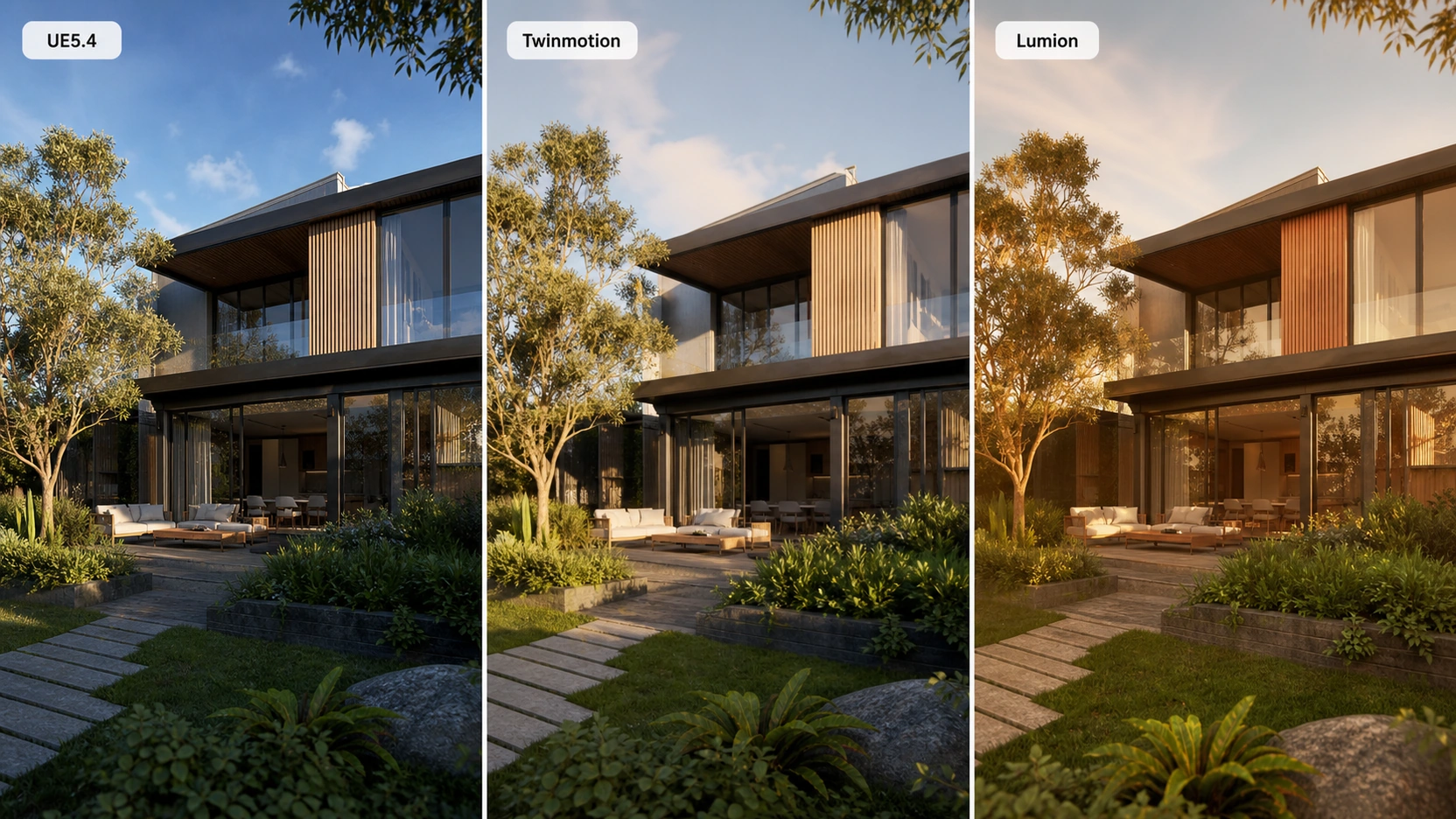
Feature Comparison
Unreal Engine 5.4 – Lumen and Nanite
Unreal Engine 5.4 is not architecture walkthrough software by original design, it is a game engine. Its application to architectural visualization is driven by two specific technologies that make it compelling for the use case.
Lumen is UE5’s real-time global illumination system. It calculates dynamic, realistic light bounces throughout a scene in real-time: sunlight entering a window and scattering across walls and ceilings, interior light spilling through open doors, reflections responding to scene changes without a pre-bake step. For architecture walkthroughs, Lumen produces physically accurate interior lighting that V-Ray or Corona achieve only through a render pass, Lumen does it in real-time at presentation quality.
Nanite is UE5’s virtualized geometry system. It allows high-polygon CAD geometry, imported via Datasmith from Revit or ArchiCAD, to be rendered without manual Level of Detail (LOD) optimization. Previously, architectural models required extensive polygon reduction before they were usable in real-time engines. Nanite eliminates this step, making the Revit-to-UE5 pipeline considerably faster.

The ceiling: UE5.4 produces the highest output quality of any architecture walkthrough software currently available. It also supports interactive real-time applications : product configurators, room layout tools, VR walkthroughs with user interaction, that neither Twinmotion nor Lumion support natively.
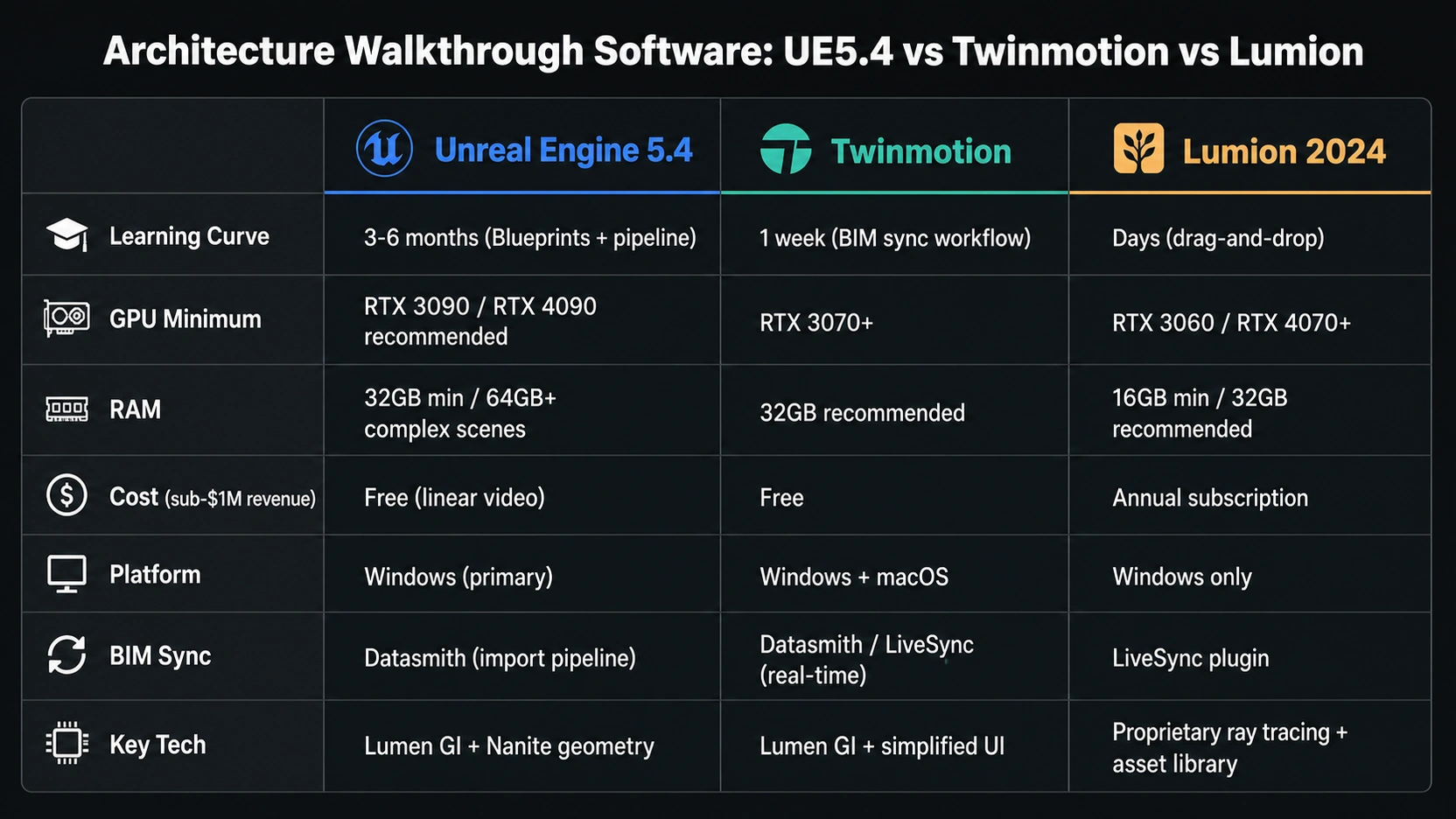
The floor: UE5 requires Blueprints visual scripting for anything beyond a pre-rendered animation. Material node graphs, scene optimization for large architectural datasets, and real-time performance profiling all require substantial training. The realistic time investment to reach professional-level UE5 output as a dedicated visualization artist: 3 to 6 months of daily use.
Twinmotion – Simplified UE5 for Architects
Twinmotion is built on the Unreal Engine 5 foundation but wrapped in a simplified, architect-oriented interface. It provides access to Lumen and Nanite through a drag-and-drop workflow that does not require Blueprints knowledge or material node work.
The key differentiator for architects is Datasmith integration. Twinmotion syncs bi-directionally with Revit, SketchUp, ArchiCAD, and Rhino via Datasmith and LiveSync. A design change in Revit updates the Twinmotion scene automatically, eliminating the re-import and re-setup cycle that slows every other workflow when designs evolve during the visualization phase.
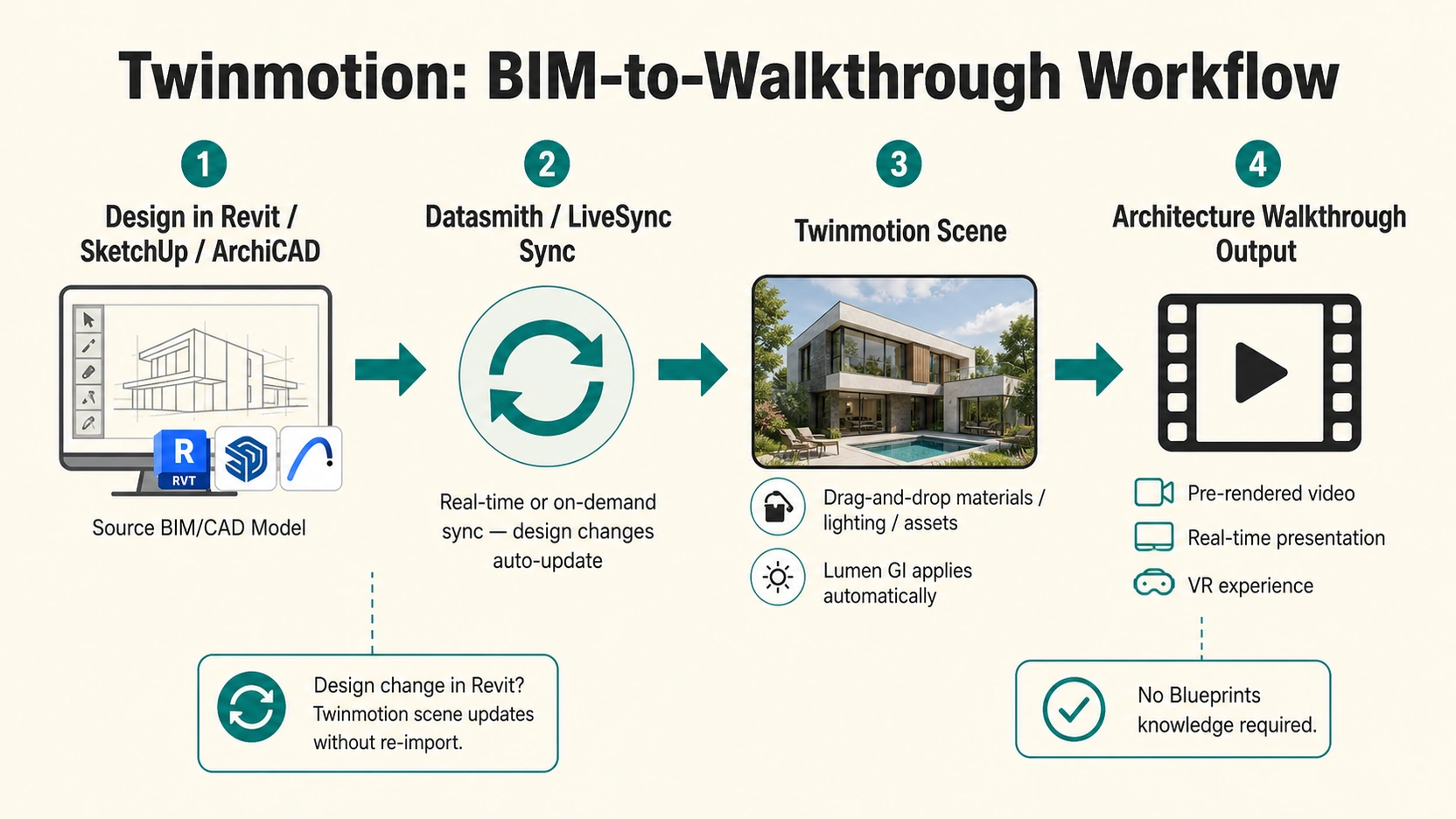
Cost model: free for studios with annual revenue under $1M. Per-seat pricing above that threshold.
Platform: Windows and macOS (including Apple M-series), the only one of the three tools that runs natively on Mac.
Learning curve: 1 week to functional walkthrough output for an architect with existing Revit or SketchUp experience.
Lumion – Presentation-Ready Output, Fastest Setup
Lumion is the architecture walkthrough software most associated with fast, polished output. Its strength is not technical ceiling, it is the ratio of output quality to setup time. The built-in asset library covers trees, vegetation, people, vehicles, interior furniture, and urban elements. For an architect producing a context visualization, a building in a city block, a residential scheme with landscaping – Lumion’s library reduces scene population time from hours to minutes.
The Lumion aesthetic: Lumion’s output has a recognizable post-processing character, warm atmospheric volumes, stylised sky rendering, a specific softness in shadow transitions. Many experienced archviz observers can identify Lumion output on sight. For studios where brand differentiation from “off-the-shelf renderer” aesthetics matters, this is a genuine consideration.
Cost model: per-seat annual subscription. No free tier for professional use. Windows only.
Learning curve: days to functional output for an architect already using CAD software. LiveSync connects Lumion to Revit, SketchUp, ArchiCAD, and Rhino.
Hardware Requirements
This is where UE5 creates a real studio infrastructure question.
Unreal Engine 5.4 recommended:
- GPU: NVIDIA RTX 3090, RTX 4080, or RTX 4090 (16GB VRAM minimum, more for complex scenes)
- RAM: 32GB minimum, 64GB+ for large architectural datasets
- Storage: Fast NVMe SSD (UE5 loads large textures and geometry from disk constantly)
- OS: Windows (primary support)
Twinmotion recommended:
- GPU: NVIDIA RTX 3070+ (Lumen and Nanite require RTX architecture)
- RAM: 32GB recommended
- Storage: NVMe SSD
- OS: Windows and macOS (including M-series)
Lumion 2024 recommended:
- GPU: NVIDIA RTX 3060 or RTX 4070+ (8GB VRAM minimum, 12GB+ recommended)
- RAM: 16GB minimum, 32GB+ recommended
- Storage: NVMe SSD
- OS: Windows only
The hardware implication: if a studio’s existing workstations have RTX 3060 or RTX 3070 cards and 32GB RAM, Twinmotion and Lumion are immediately usable. A move to UE5.4 for complex scenes may require hardware investment (RTX 4090, 64GB RAM) before the tool delivers its quality ceiling. Hardware upgrade cost belongs in the UE5 migration budget.
For architecture walkthrough camera movement and pacing strategy in all three tools, see our guide on 3D architectural walkthrough camera speeds.
Cost and Licensing
| Tool | Cost Model | Free Tier? | Platform |
|---|---|---|---|
| Unreal Engine 5.4 | Free for linear/non-interactive content. Seat-based above $1M revenue for interactive apps. | Yes (for architecture walkthrough video) | Windows (primary) |
| Twinmotion | Free for studios under $1M annual revenue. Per-seat pricing above. | Yes (sub-$1M) | Windows + macOS |
| Lumion 2024 | Per-seat annual subscription. | No | Windows only |
For studios producing architecture walkthroughs as pre-rendered video output (the majority of residential and commercial development marketing), both UE5 and Twinmotion are free at sub-$1M revenue. Lumion is the only tool that requires annual licensing at all revenue levels.
A Three-Profile Decision Framework
Three Studio Types
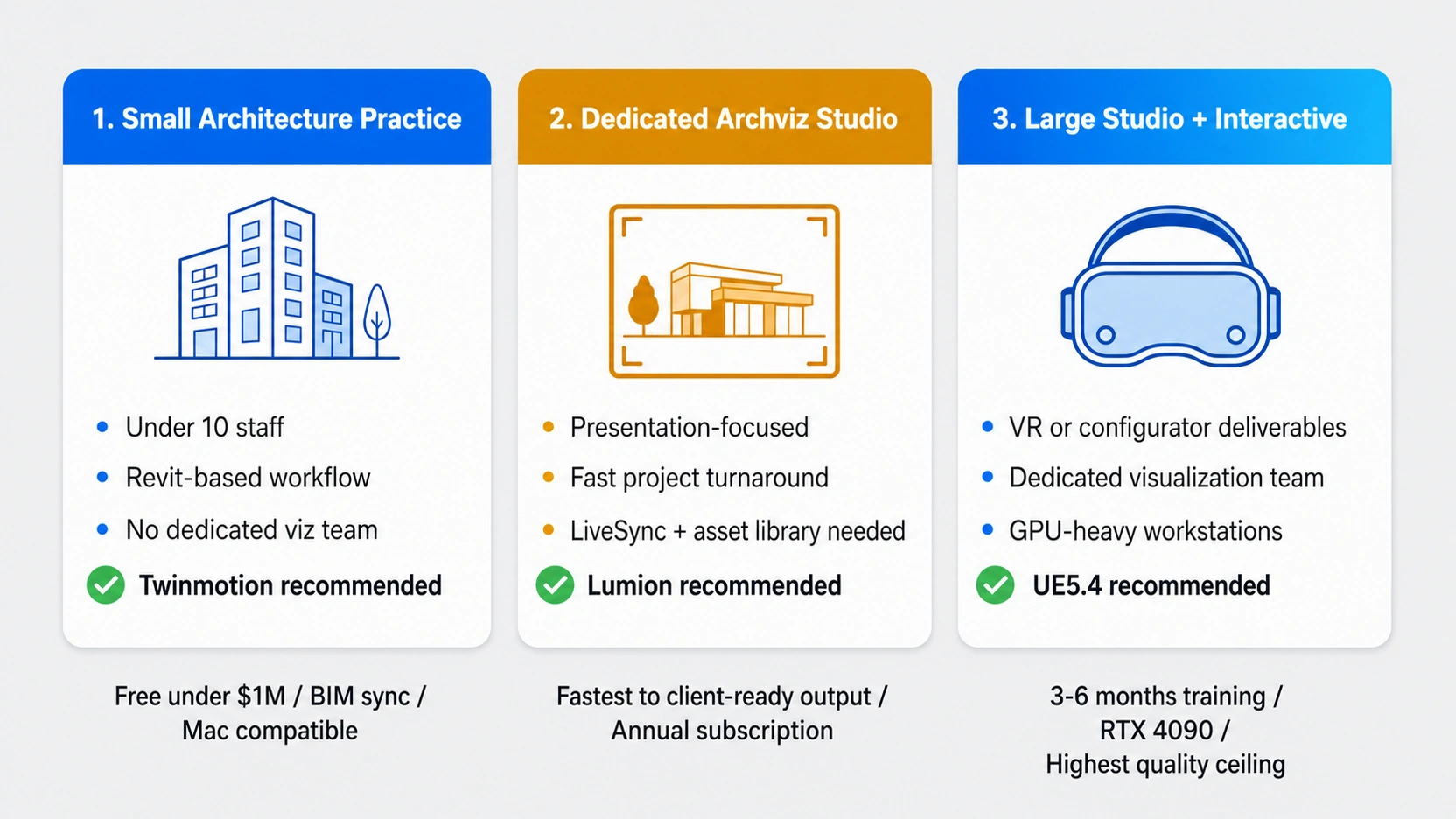
Three studio types, three different correct answers for architecture walkthrough software:
- Small architecture practice (under 10 staff, Revit-based, no dedicated visualization team): Twinmotion. Free at sub-$1M revenue, BIM sync via Datasmith eliminates re-import cycles, Windows and Mac compatible, learnable in one week. Delivers Lumen and Nanite quality through a simplified interface.
- Dedicated archviz studio, presentation focus, fast project turnaround required: Lumion. Fastest route from CAD import to client-ready output. Asset library reduces scene population time. The subscription cost is offset by time saved per project against any alternative.
- Large visualization studio or developer with interactive requirements (VR, configurators, real-time customization): Unreal Engine 5.4. The only tool that supports custom interactive applications, VR with user interaction, and the absolute highest quality ceiling. Requires 3 to 6 months training investment and hardware (RTX 4090, 64GB RAM for complex scenes).
At RenderInfinity, architecture walkthrough projects are produced in UE5.4 for interactive and VR deliverables and in V-Ray for pre-rendered cinematic output. For a comparison of how freelance and studio production costs differ on walkthrough projects, see our post on architectural 3D animation: freelancer vs studio.
What to Know
- The three dominant architecture walkthrough software tools are Unreal Engine 5.4 (Lumen GI, Nanite geometry, highest quality ceiling, steepest learning curve), Twinmotion (UE5 technology with simplified interface, free under $1M, BIM sync, Windows and Mac), and Lumion 2024 (fastest to client-ready output, per-seat subscription, Windows only, recognizable warm aesthetic).
- Hardware: UE5 — RTX 3090/4090, 32GB minimum RAM (64GB+ complex scenes), fast NVMe SSD. Lumion — RTX 3060/4070+, 16GB minimum. Twinmotion — RTX 3070+, 32GB RAM, Windows and Mac. Existing RTX 3060/3070 workstations are immediately usable in Twinmotion and Lumion.
- Learning curve: UE5 Blueprints and material pipeline — 3 to 6 months to professional-level output. Lumion — days to functional client-ready output. Twinmotion — 1 week to BIM-sync walkthrough proficiency.
- Cost: UE5 and Twinmotion are free for sub-$1M revenue studios producing architecture walkthrough video. Lumion requires per-seat annual subscription at all revenue levels. Only Lumion is Windows-exclusive among the three.
- The Lumion aesthetic is recognizable: warm post-processing, stylised volumetric atmosphere, distinctive sky rendering. For studios where output differentiation from “off-the-shelf” aesthetics matters, Twinmotion or UE5 produce less stylistically branded results.
Frequently Asked Questions
What is the best architecture walkthrough software in 2026?
The best architecture walkthrough software depends on studio capacity. Twinmotion is the best choice for architecture practices that need BIM sync, a low learning curve, and professional output without a dedicated visualization team, and it is free under $1M annual revenue. Lumion is the best for studios where speed to client-ready output is the primary metric. Unreal Engine 5.4 produces the highest quality ceiling and supports interactive walkthroughs, but requires 3 to 6 months of training and high-end hardware (RTX 4090, 64GB RAM) to reach that ceiling.
What is Lumen in Unreal Engine 5 for architecture walkthroughs?
Lumen is UE5’s real-time global illumination system. It calculates dynamic light bounces throughout a scene in real-time: sunlight scattering across interior walls, interior lamp spill responding to scene changes, reflections updating without a pre-bake step. For architecture walkthroughs, Lumen produces physically accurate lighting that V-Ray or Corona achieve only through a render pass — Lumen provides it in real-time at presentation quality. Nanite, UE5’s companion system, allows high-polygon CAD geometry from Revit to be imported without manual polygon reduction.
Is Twinmotion free for architects?
Yes. Twinmotion is free for studios or individuals with annual revenue under $1M. Per-seat licensing applies above that threshold. For most small to mid-size architecture practices, the free tier covers professional production needs. Twinmotion runs on Windows and macOS (including Apple M-series), the only one of the three major architecture walkthrough software tools with native Mac support.
How much RAM does Unreal Engine 5 need for architecture walkthroughs?
Unreal Engine 5.4 requires 32GB RAM as a working minimum for architecture walkthrough production. Complex scenes with large architectural datasets, dense vegetation, or high-resolution textures benefit from 64GB or more. Lumion 2024 requires 16GB minimum (32GB+ recommended), and Twinmotion requires 32GB recommended. If existing workstations have 16GB to 32GB RAM with RTX 3060 to RTX 3070 GPUs, Twinmotion and Lumion are immediately usable, a move to UE5 may require hardware investment before the tool delivers its quality ceiling.
Can I use Lumion on a Mac for architecture walkthroughs?
No. Lumion is Windows-only architecture walkthrough software. Twinmotion is the alternative with native macOS support, including Apple M-series chips. For Mac-based architecture practices, Twinmotion is the only high-quality real-time architecture walkthrough software among the three tools. It delivers Lumen and Nanite quality through a simplified drag-and-drop interface and syncs with Revit and SketchUp via Datasmith and LiveSync without requiring a Windows workstation.
Conclusion
Architecture walkthrough software selection is not a quality race. Unreal Engine 5.4, Twinmotion, and Lumion are all capable of producing output that wins client presentations at the highest level. The decision is made by matching the tool to the studio’s actual capacity: training time available, hardware on hand, project timelines, and whether the deliverable is pre-rendered video, interactive real-time, or VR.