

3D Architectural Walkthrough Services: The Handoff Checklist That Prevents Expensive Re-Renders
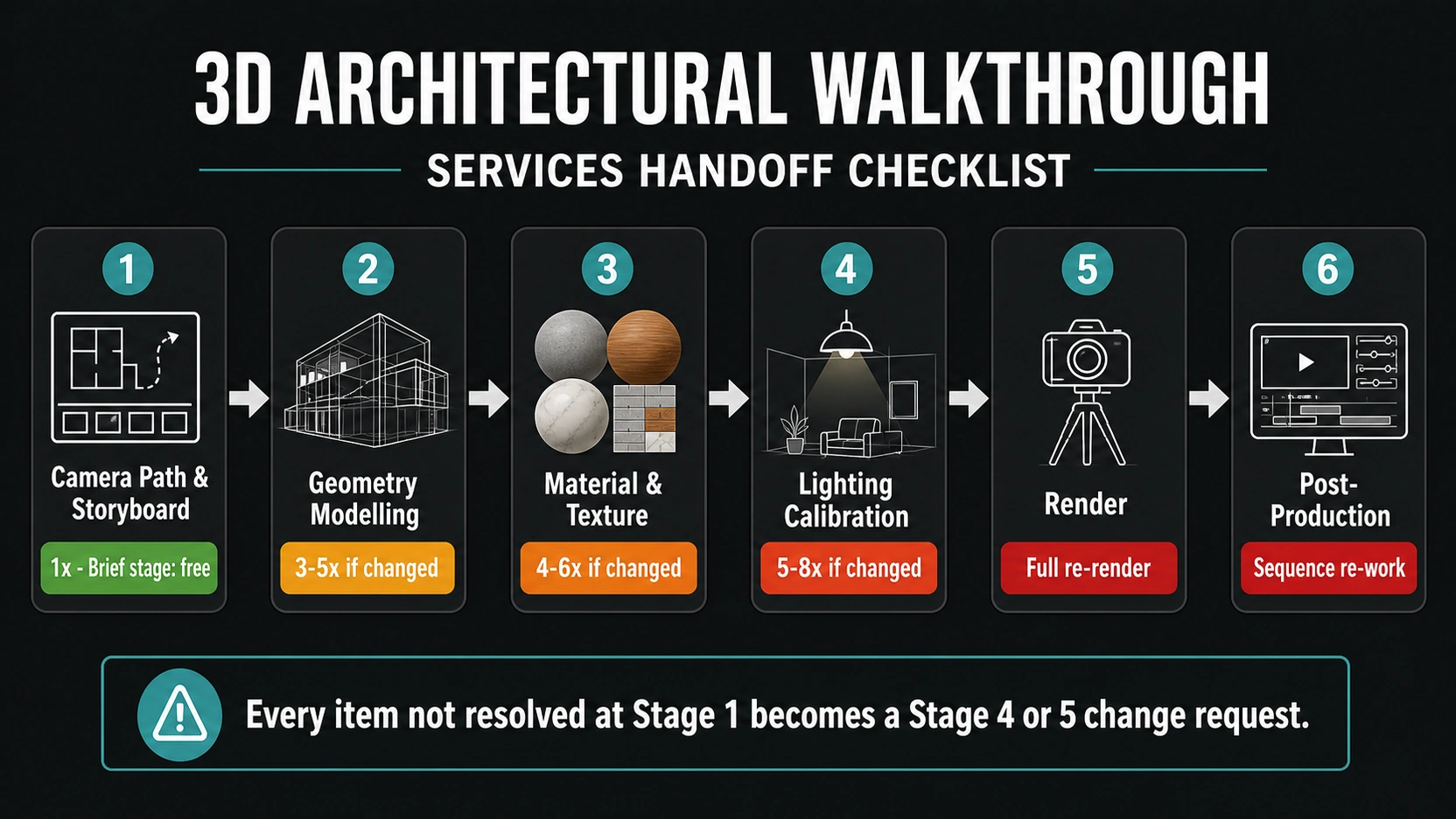
The Production Stage Lock-In Sequence
The 3D architectural walkthrough services production process has six sequential stages. Changes made after a stage is locked are more expensive than changes made before it and the cost multiplier increases at each stage.
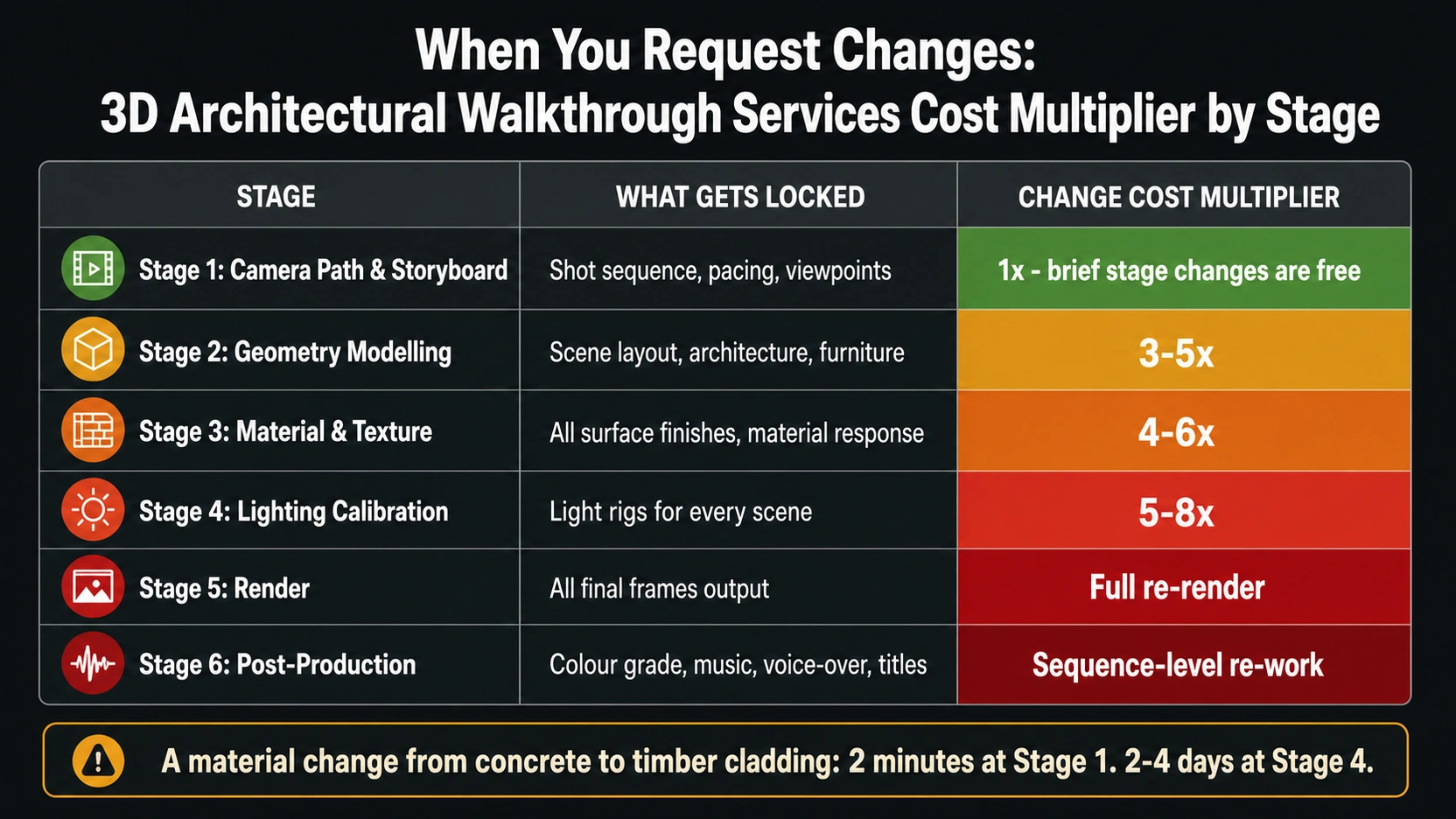
| Stage | What Gets Locked | Change Cost Multiplier |
|---|---|---|
| 1. Camera path and storyboard | Shot sequence, pacing, viewpoints | 1x – brief stage changes are free |
| 2. Geometry modelling | Scene layout, architecture, furniture position | 3-5x – repositioning scene for new camera path |
| 3. Material and texture application | All surface finishes and material response | 4-6x – re-texturing and re-lighting |
| 4. Lighting calibration | Light rigs for every scene | 5-8x – re-calibrating to new materials, re-rendering |
| 5. Render | All final frames output | Full re-render of affected sequences |
| 6. Post-production | Colour grade, music, voice-over, titles | Sequence-level re-work |
The practical implication: a material change from concrete to timber cladding on the facade, requested after lighting calibration is complete (stage 4), requires re-applying all materials, re-calibrating the entire lighting rig to the new material response, and re-rendering every affected frame. That change which takes an architect 5 seconds to request, takes a studio 2-4 days to implement at stage 4. The same change takes 2 minutes to specify at brief stage.
Every item in this checklist is an item that, if unresolved at brief stage, will appear as a stage 4 or stage 5 change request.
The Five Pre-Production Items That Must Be Confirmed
These five items must be resolved before a 3D architectural walkthrough services studio begins modelling. Each one, if changed after modelling starts, triggers a stage multiplier.
1. Voice-Over Script and Timing
If the walkthrough includes a voice-over narration, the script must be finalised and timed before camera path animation begins. Shot duration is locked to narration timing. At a standard narration pace of approximately 120 words per minute (2 words per second), a 90-second walkthrough supports approximately 180 words of narration. Each scene in the camera path has a defined duration in seconds. If the narration says “the open-plan kitchen and dining area, bathed in natural morning light” over 6 seconds, the camera must traverse that space in exactly 6 seconds. Changing the narration after camera path animation is complete requires re-timing the camera motion — a full animation re-work.
2. Music and Audio Selection
The camera animation pacing and cut rhythm of a 3D architectural walkthrough is calibrated to the music. The BPM (beats per minute) of the music bed determines where cuts fall, how fast the camera moves through each space, and where the animation lingers. Selecting music after animation is complete is equivalent to choosing a backing track for an already-edited film. Audio selection must happen before camera path animation begins, not after.
3. Final Floor Plan and Geometry
No changes to the architectural design are possible after geometry modelling begins without triggering a full model rebuild for the affected areas. “We’ll finalise the kitchen layout next week” is not compatible with a 3D architectural walkthrough services timeline. The floor plan, elevations, and sections submitted at brief stage are the ones that will be built. If design development is still ongoing, the correct approach is to stage the brief: confirm fixed rooms first, model those, and schedule a second brief submission for interior finishes once design decisions are locked.
4. Material Schedule
Material specification must be resolved to reference level, not “we’re thinking limestone” but “Jura Beige limestone, sawn finish, 600x400mm panel, matching mortar.” This level of specification matters because material roughness, colour, and finish affect how the lighting rig is calibrated. A polished Carrara marble facade and a honed Jura limestone facade require entirely different lighting setups to look photorealistic.
“Preferred” vs “non-negotiable” designations are required for every surface. Studios make production decisions under time pressure, knowing which materials are fixed and which are creative latitude prevents the most common post-delivery disputes.
5. Lighting Scenario: Day, Time, and Weather
The lighting scenario, time of day, weather condition, and season – must be specified at brief stage. Each scenario requires a different lighting rig. Changing the lighting scenario after stage 4 (lighting calibration) requires rebuilding the entire lighting rig and re-rendering every frame. Switching from an overcast to a golden-hour scenario typically increases render time by 20-40% due to the additional complexity of direct sunlight, lens flare, and warm/cool contrast processing.
The Camera Path Review
The camera path and storyboard review is the most important approval in the entire 3D architectural walkthrough services production process and the one most commonly given insufficient attention. Once geometry modelling begins around the approved camera path, changing the path requires repositioning entire scene elements.
The camera path review should receive the same level of attention as a planning drawing review. Specific items to confirm:
- Does the path move through all the spaces the client considers selling points?
- Does the exterior approach communicate the building’s primary facade?
- Does the path duration allow sufficient time in each key space?
- Is there a clear arrival and departure sequence (exterior approach, entry, primary living spaces, secondary spaces, views from windows)?
- Are any important design features missed by the current path?
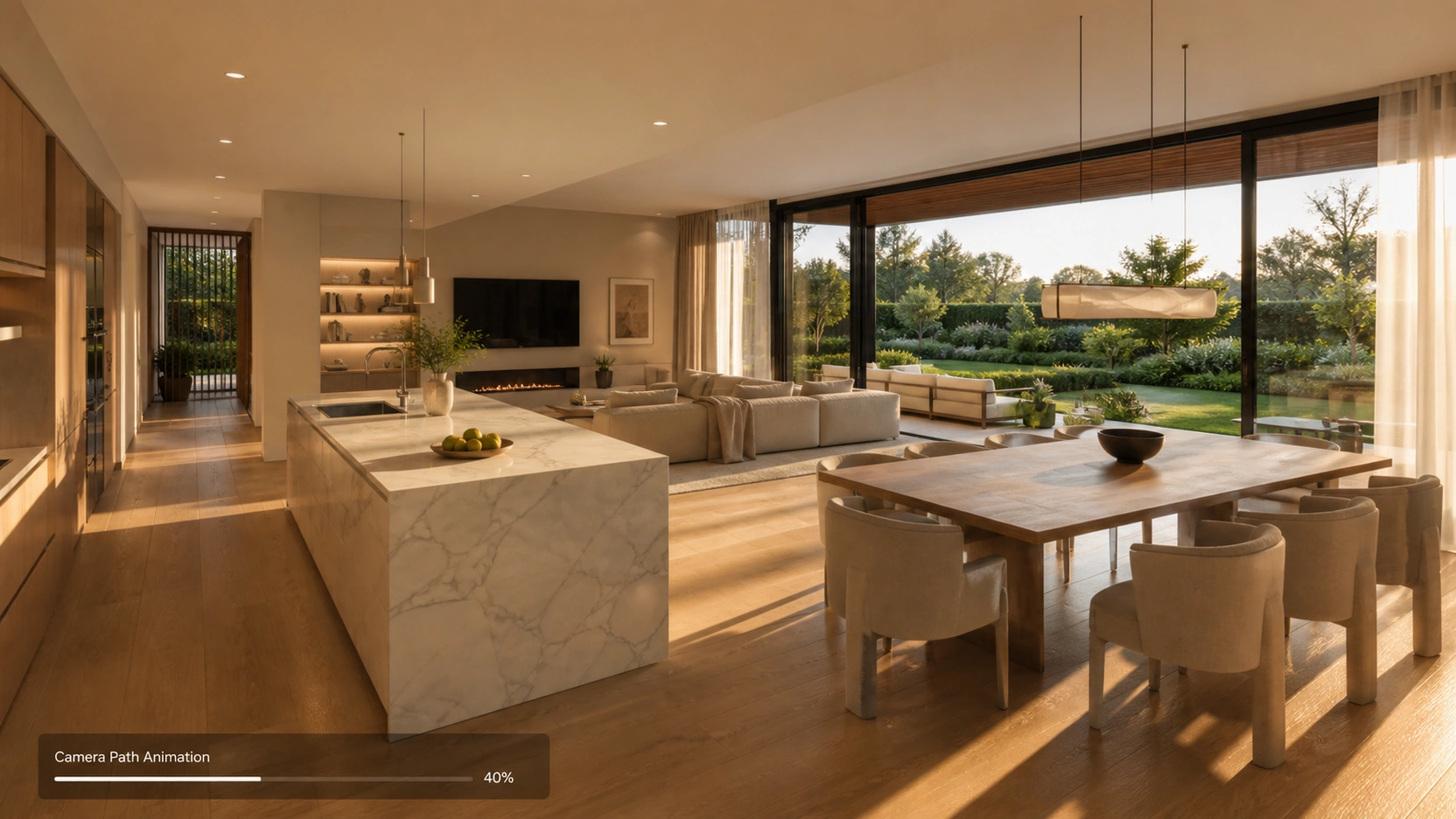
A camera path approved in 10 minutes and later found to have missed a key feature or included an unflattering angle of a non-negotiable space will require a production re-work at the most expensive stage.
The Deliverable Format Stack
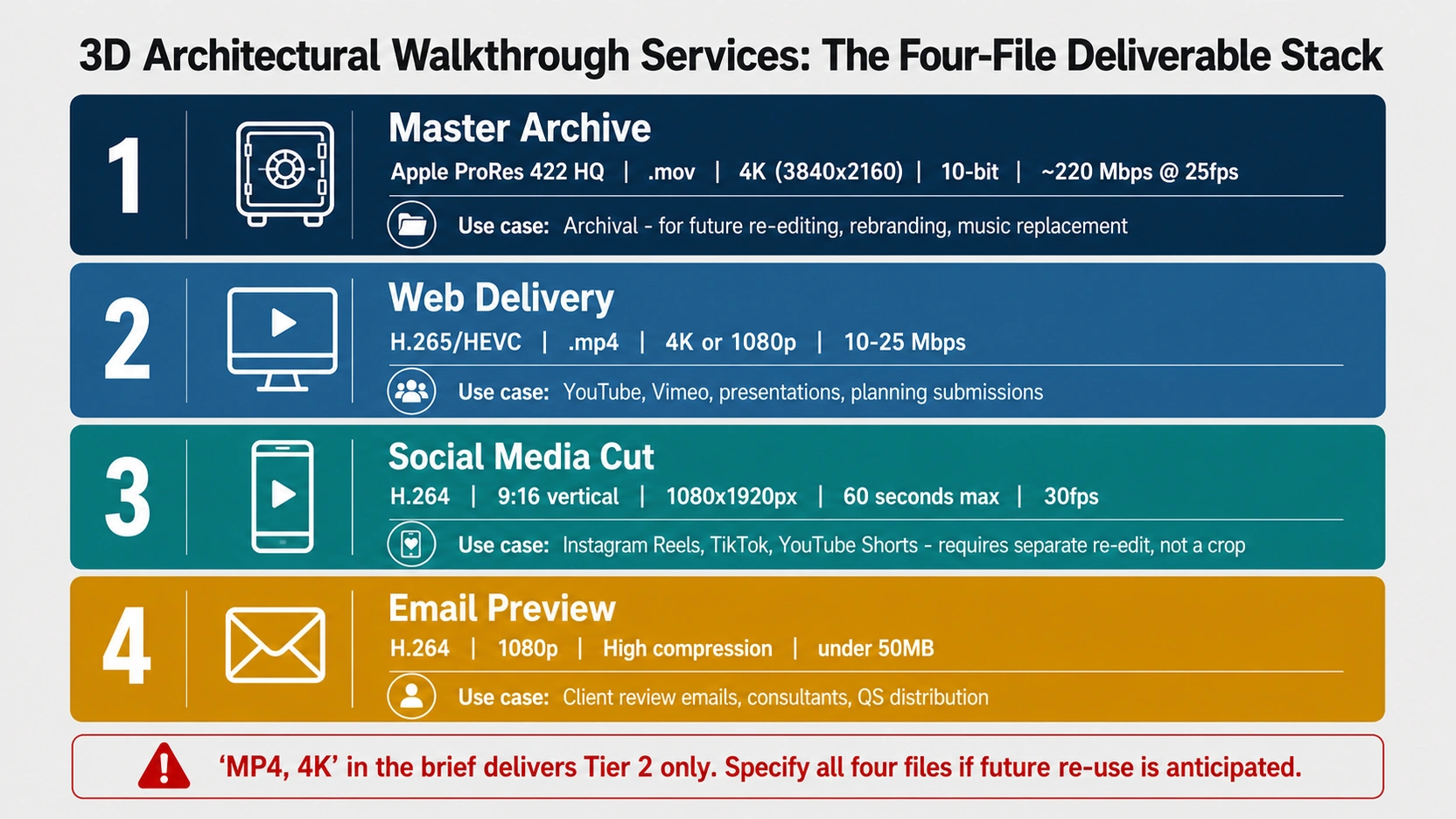
Most briefs for 3D architectural walkthrough services specify “MP4, 4K” and consider the format question answered. A professional deliverable for a high-end project requires four separate files.
Master Archive File
Apple ProRes 422 HQ, .mov wrapper, 4K (3840×2160), 10-bit colour, approximately 220 Mbps at 25fps. This is the archival master — the file from which all future derivatives are produced. Required for: re-editing with updated branding, replacing the music track, adding subtitles for different markets, re-cutting for a new platform format. Studios typically retain masters internally; clients should explicitly request the master file in the brief if they anticipate future re-use.
Web Delivery File
H.265/HEVC, .mp4 wrapper, 4K or 1080p depending on target platform, 10-25 Mbps. This is the standard presentation and upload file. Suitable for: YouTube, Vimeo, website embedding, investor presentations, planning submissions. Specifying “MP4, 4K” in the brief typically delivers this file only.
Social Media Cut
H.264, 9:16 vertical crop (1080×1920 pixels), 30-60 seconds maximum duration, 30fps. Required for: Instagram Reels, TikTok, YouTube Shorts. This is a separate edit, not a simple crop of the 16:9 master. A vertical social cut requires re-framing of the key moments and a separate edit to the shorter duration. This is not automatically included in a standard 3D architectural walkthrough services deliverable – it must be specified in the brief.
Email / Low-Bandwidth Preview
H.264, 1080p, high compression, under 50MB file size. Used for client review emails, sharing with planning consultants, and forwarding to quantity surveyors. A 4K ProRes master at 220 Mbps cannot be sent by email — a compressed preview is required for review distribution.
The Three Most Commonly Forgotten Handoff Items
North Orientation
North orientation determines sun path accuracy. A 3D architectural walkthrough services lighting rig is calibrated to simulate a specific time of day at the project’s actual geographic location. If north orientation is not provided, the studio makes an assumption — and the resulting renders may show sunlight entering the building from the wrong direction. For a project where “morning light through east-facing living room windows” is a specific selling point, an incorrect north orientation renders that selling point inaccurate.
Surrounding Context Geometry
What is visible through windows and beyond site boundaries? For an urban project, the buildings visible through the living room windows are part of the viewer’s experience of the walkthrough. A studio without context geometry fills those viewpoints with a generic city backdrop or an HDRI sky – which may be inconsistent with the actual site. For a project where a specific landmark, park, or waterfront view is a selling point, context geometry must be provided.
“Non-Negotiable” vs “Preferred” Material Designations
Every material in the brief should be tagged as either fixed (non-negotiable — specified product, no substitution) or preferred (creative latitude, the studio may adjust hue, finish, or scale to suit the lighting and aesthetic). Studios make real-time production decisions when they encounter ambiguous materials under time pressure. Without this designation, a studio may substitute a material that conflicts with the planning-approved specification.
Complete Handoff Checklist
Pre-production (must be resolved before modelling):
- Floor plan, elevations, and sections at final design stage (no changes expected)
- Material schedule with product references – tagged as “fixed” or “preferred”
- Lighting scenario: time of day, weather, season
- North orientation and geographic location
- Voice-over script finalised and timed (if included)
- Music/audio bed selected and approved (if included)
- Context geometry or surroundings reference (neighbouring buildings, site boundary)
Camera path review (approve before modelling begins):
- Storyboard or marked-up floor plan showing camera path
- Shot list with approximate duration per scene
- Confirmation of all key spaces included in the path
- Exterior approach and arrival sequence confirmed
- All selling points (views, features, volume) covered by the path
Deliverable specification:
- Resolution: 4K (3840×2160) or 1080p (1920×1080)
- Frame rate: 24fps (cinematic), 25fps (EU broadcast), 30fps (web/social)
- Master archive file required: Apple ProRes 422 HQ, .mov (yes/no)
- Web delivery format: H.265/HEVC .mp4 (yes/no)
- Social media vertical cut required: 9:16, 60 seconds max (yes/no)
- Compressed email preview required: H.264, 1080p, under 50MB (yes/no)
- Aspect ratio: 16:9 (standard) and/or 9:16 (vertical/social)
Revision process:
- Number of included revision rounds confirmed
- Definition of “revision” agreed (camera path change vs colour grade adjustment)
- Revision stage lock-in communicated to client (changes after stage 4 = 5-8x cost multiplier)
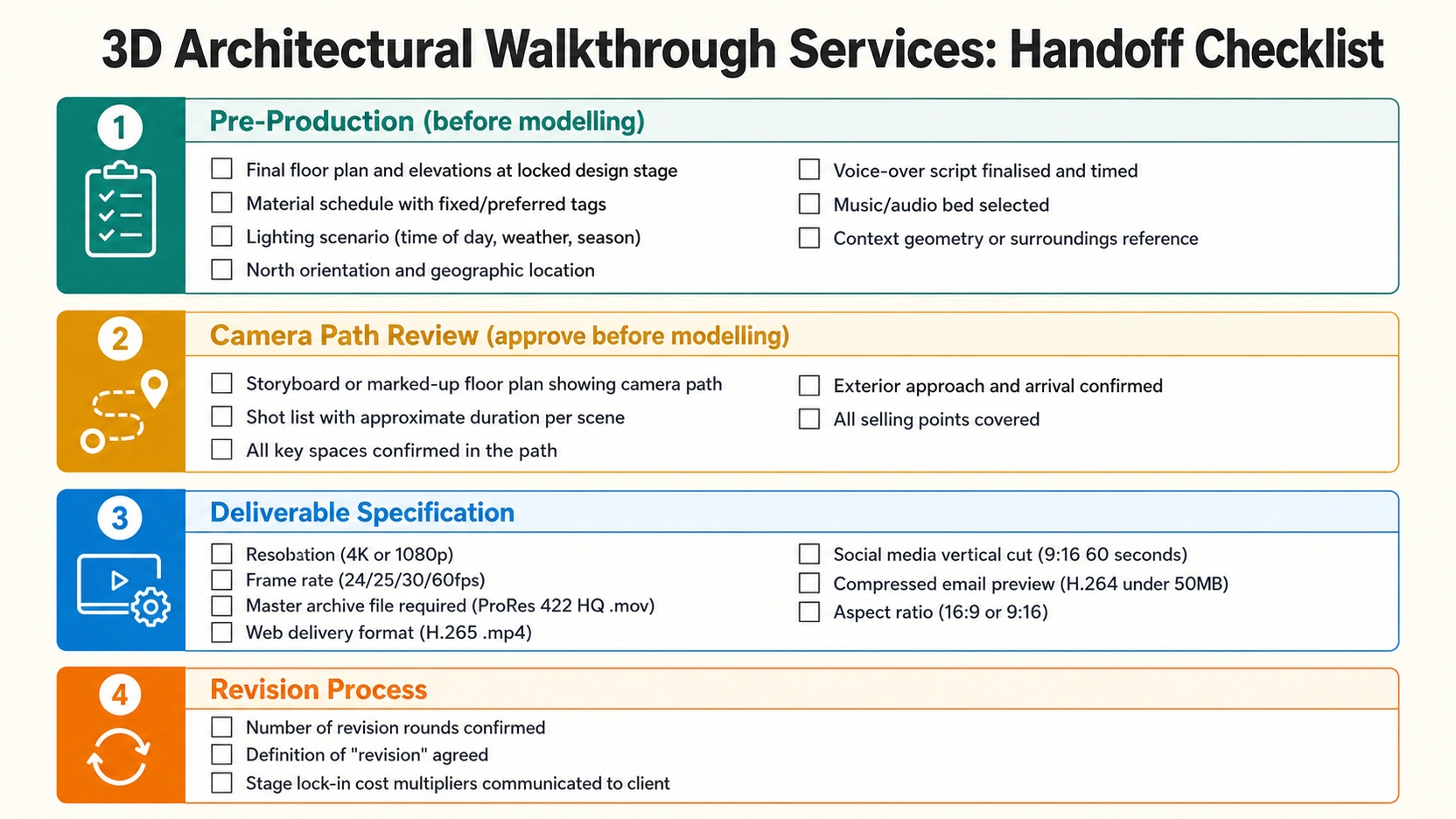
At RenderInfinity, every 3D architectural walkthrough services project begins with a brief review call that covers this checklist in sequence – camera path first, materials second, deliverable stack third. The call takes 30-45 minutes and eliminates the majority of mid-production revision triggers.
For how architectural walkthrough services compare to interactive Matterport for off-plan developer marketing, see our post on 3D floor plan walkthrough: CGI vs Matterport.
At a Glance
- The 3D architectural walkthrough services production process has six stages with a cost multiplier that escalates at each stage. A material change at brief stage takes 2 minutes. The same change at lighting calibration stage (stage 4) takes 2-4 days – a 5-8x multiplier.
- Five pre-production items must be confirmed before modelling starts: voice-over script and timing, music/audio selection, final floor plan geometry, material schedule with “fixed” or “preferred” designation, and lighting scenario (time of day, weather, season).
- The camera path and storyboard review is the highest-stakes approval in the entire project — it defines what the viewer sees, for how long, and in what order. Once modelling begins around the approved path, camera changes require full scene repositioning.
- A professional 3D architectural walkthrough services deliverable requires four files: master archive (ProRes 422 HQ, .mov, 4K, 10-bit), web delivery (H.265, .mp4), social media vertical cut (H.264, 9:16, 60 seconds – a separate re-edit, not a crop), and compressed email preview (H.264, 1080p, under 50MB). “MP4, 4K” in the brief delivers only the web file.
- Three handoff items most commonly forgotten: north orientation (sun path accuracy), context geometry (what’s visible through windows and beyond site boundaries), and “fixed vs preferred” material designations (prevents post-delivery disputes on substituted materials).
Frequently Asked Questions
What should be included in a 3D architectural walkthrough services brief?
A complete brief includes: floor plan and elevations at final design stage; material schedule with specific product references tagged as fixed (non-negotiable) or preferred (creative latitude); lighting scenario (time of day, weather, season); north orientation and geographic location; voice-over script finalised and timed (if applicable); music/audio bed selection (if applicable); context geometry for surroundings; and the full deliverable format stack (master archive format, web delivery, social media cut, aspect ratio). The camera path storyboard should be reviewed and approved before modelling begins.
What file format should a 3D architectural walkthrough be delivered in?
A professional 3D architectural walkthrough requires at minimum two files: a master archive (Apple ProRes 422 HQ, .mov, 4K, 10-bit colour) for archival and future re-editing; and a web delivery file (H.265/HEVC, .mp4, 4K or 1080p) for presentations and online platforms. For social media, an additional 9:16 vertical cut (H.264, 1080p, 60 seconds maximum) is a separate edit — not a crop of the master and must be specified in the brief. A compressed email preview (H.264, 1080p, under 50MB) is useful for review distribution. “MP4, 4K” in the brief typically results in the web delivery file only.
What frame rate should I specify for a 3D architectural walkthrough?
24fps is the cinematic standard, the frame rate of film, giving a premium narrative-quality feel. 25fps is the EU and UK broadcast standard. 30fps is standard for web delivery and social media. 60fps is used for high-end marketing suite display screens and some VR applications. For most architectural developer marketing (Vimeo, YouTube, presentations), 25fps or 30fps is appropriate. Specifying 60fps doubles the render frame count and significantly increases production time and cost, only request it if the destination medium requires it.
When is it too late to change the camera path in a 3D architectural walkthrough?
Camera path changes are free at brief and storyboard stage. Once geometry modelling has started immediately after the camera path is approved – camera changes require repositioning furniture and entourage placed for the original viewpoints, re-framing architectural elements, and re-calibrating the lighting for the new angles. The cost multiplier for a camera path change after modelling starts is approximately 3-5x the brief-stage cost. Changes requested after lighting calibration carry a 5-8x multiplier. The camera path review should receive the same scrutiny as a planning drawing approval.
Does a 3D architectural walkthrough brief need a voice-over script before production starts?
Yes, if a voice-over narration is included. The script must be finalised and timed before camera path animation begins, because shot duration is locked to narration timing. At 120 words per minute (standard narration pace), a 90-second walkthrough supports approximately 180 words. Each scene’s camera animation duration matches the narration duration for that space. Changing the script after camera animation is complete requires re-timing the entire animation – a full re-work. Music selection must also precede animation, as the camera pacing and cut rhythm are calibrated to the music’s BPM and energy arc.
Conclusion
Every expensive revision in a 3D architectural walkthrough services project starts with an item that was deferred at brief stage. The camera path, the material schedule, the voice-over timing, the lighting scenario, and the deliverable format stack are all decisions that cost nothing to make before modelling begins and progressively more to make after each production stage locks in.
At RenderInfinity, the brief review call runs through this checklist before any production begins. Visit our architectural walkthrough services page to send a brief or discuss a project – or use the checklist above to prepare your handoff document before your first call with any studio.