

Floor Plan 3D Rendering: Three View Types – Not Two
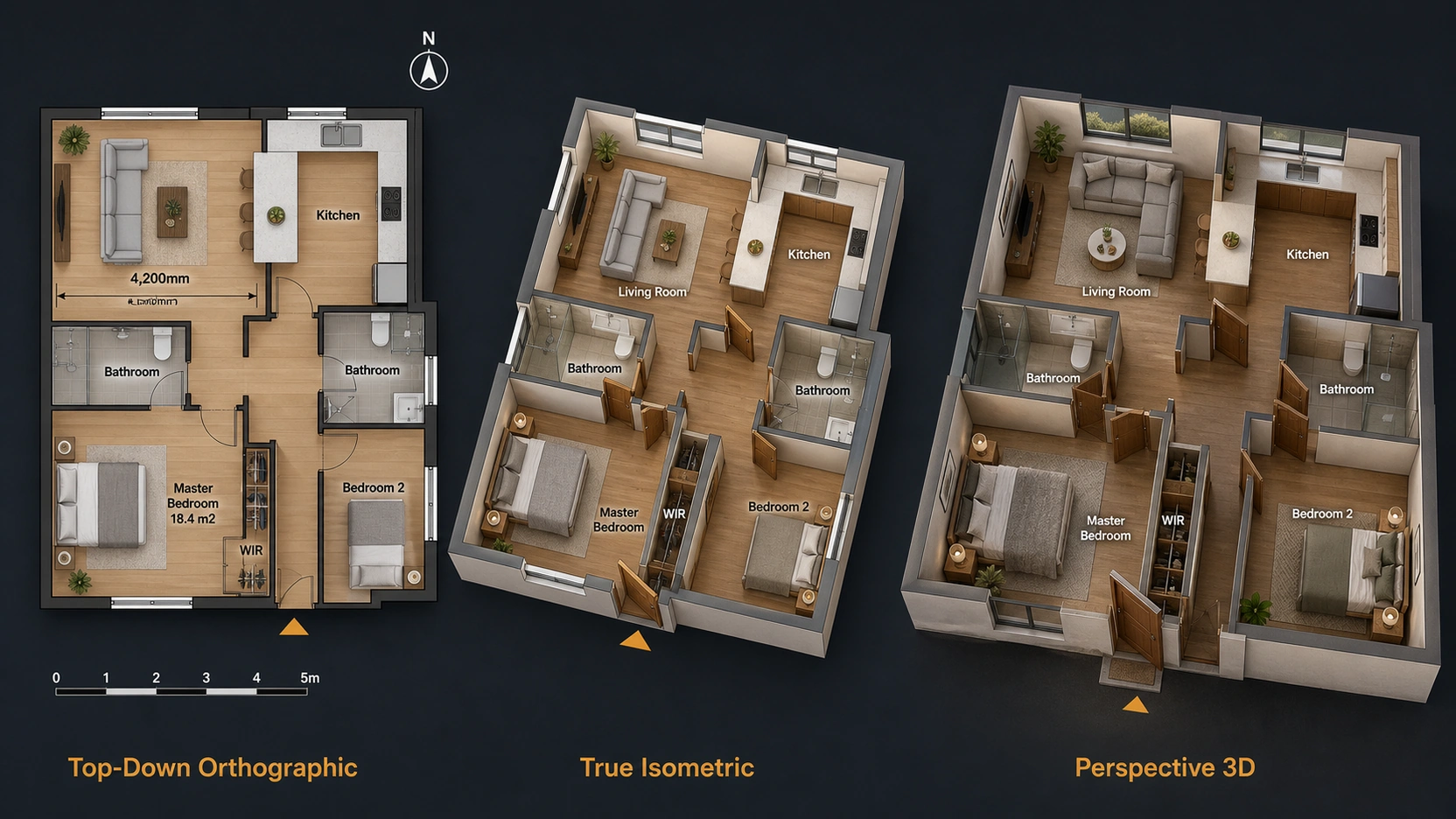
The Three View Types
1. Top-Down Orthographic
Top-down orthographic floor plan 3D rendering is taken from a camera positioned directly above the floor plane at exactly 90 degrees – no perspective, no vanishing points. Parallel lines stay parallel. Dimensions read true to scale across the entire image. This is the dimensionally accurate view type.
Top-down orthographic is the closest 3D floor plan rendering equivalent to a traditional architectural drawing. It reads like a plan drawing but with rendered materials, furniture, and textures replacing the line-weight conventions of technical drafting. Architects and planners can extract approximate dimensions from it. Contractors can read the spatial relationships between rooms without needing to convert a perspective view back to a flat plan.
Output character: Flat, map-like, clean. High information density. Technical clarity is the primary value.
Correct uses: Planning authority submissions, technical client sign-off, apartment comparison matrices in a multi-unit development sales suite, space planning reviews, construction documentation context renders.
2. True Isometric / Axonometric
True isometric floor plan 3D rendering is taken at a 30-degree angle from each horizontal axis. Like orthographic, parallel lines stay parallel and there are no vanishing points, but the camera is tilted to show three axes simultaneously, giving a sense of depth without perspective distortion. Dimensions on the three visible axes are still theoretically measurable with a scale factor applied, though this is rarely used in practice.
True isometric is less common in the residential real estate market than perspective 3D. Its clean geometric quality makes it well-suited for architecture, product, and technical communication contexts where both clarity and depth are needed.
Output character: Geometric, graphic, slightly abstract. Depth visible without perspective distortion.
Correct uses: Architecture competitions, technical design presentations, developments with a strong brand identity requiring a graphic aesthetic, infographic-style marketing materials.
3. Perspective 3D Floor Plan (The Most Common Type)
Perspective floor plan 3D rendering is taken from a camera elevated at approximately 45 to 60 degrees above the floor plane, with a wide-field-of-view lens (typically 28 to 35mm equivalent). It has a horizon line and vanishing points, dimensions are NOT accurate. The same room photographed at a slightly different camera angle or field-of-view appears larger or smaller.
This is the most widely sold “3D floor plan” in the market. Most studios call it isometric. It is not isometric. It is a perspective render. The distinction matters practically: if dimension lines or area labels are added to a perspective 3D floor plan render, they are visually misleading because the perspective distortion makes annotated dimensions feel inaccurate even if the text values are correct.
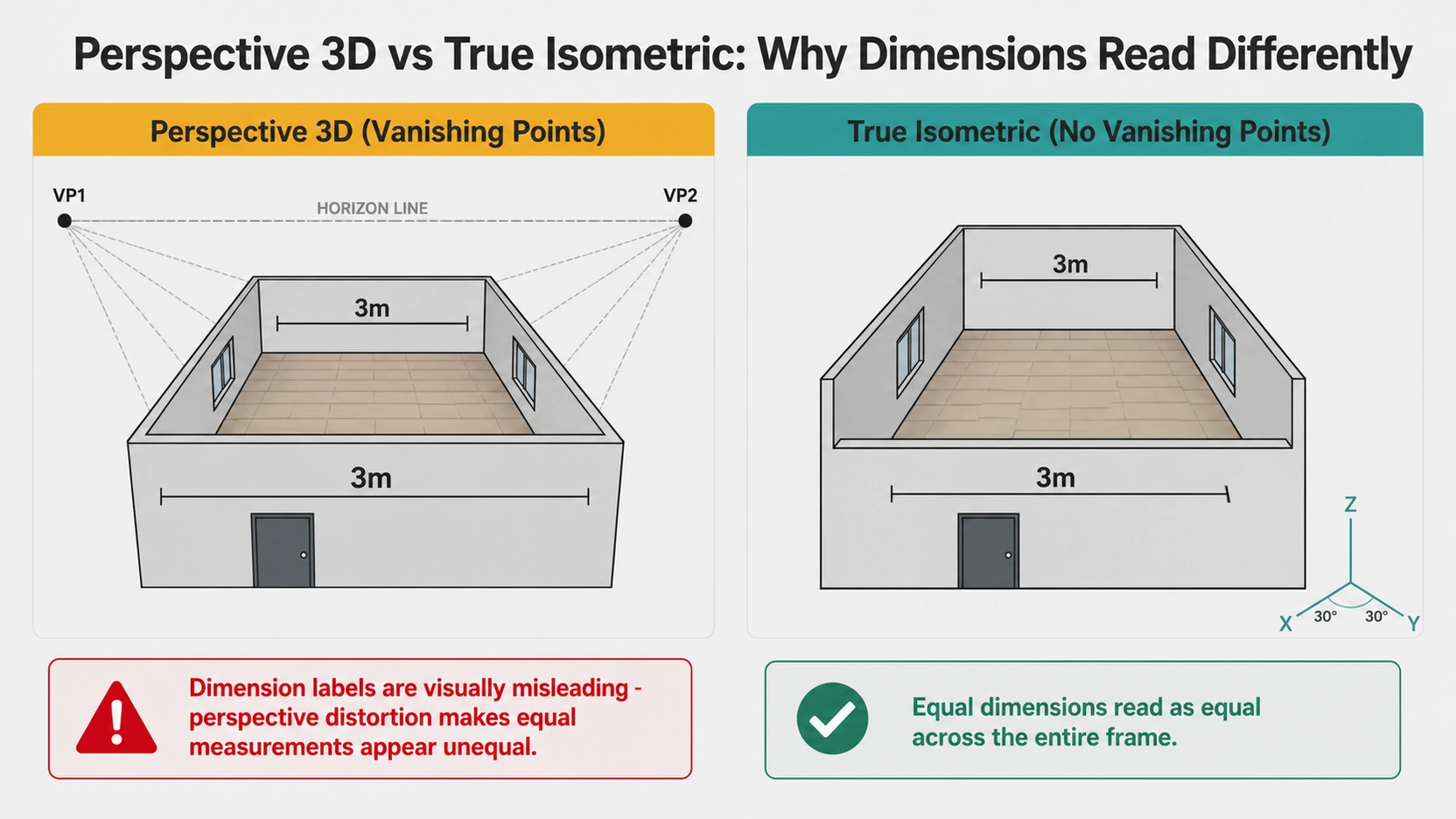
Output character: Photographic, warm, spatial. Depth and volume are immediately readable. Furniture, materials, and lighting create lifestyle appeal.
Correct uses: Off-plan residential marketing, developer sales brochures, property portals, social media listings, interior design client presentations, project websites.
The Cut Height Decision
Every top-down orthographic floor plan 3D rendering requires a cut height, the elevation at which the floor plan is horizontally sliced. Everything below the cut line appears in the render. Everything above it disappears, showing only the wall face above.
Standard cut height: 1.2 metres above finished floor level (UK convention per BS 1192; US equivalent: 4 feet above finished floor). This height captures floor surfaces, all furniture, kitchen countertops, window sills, and door openings. It does not capture: high shelving above 1.2m, wall-mounted kitchen units, bathroom wall cabinets, wall-mounted TVs.
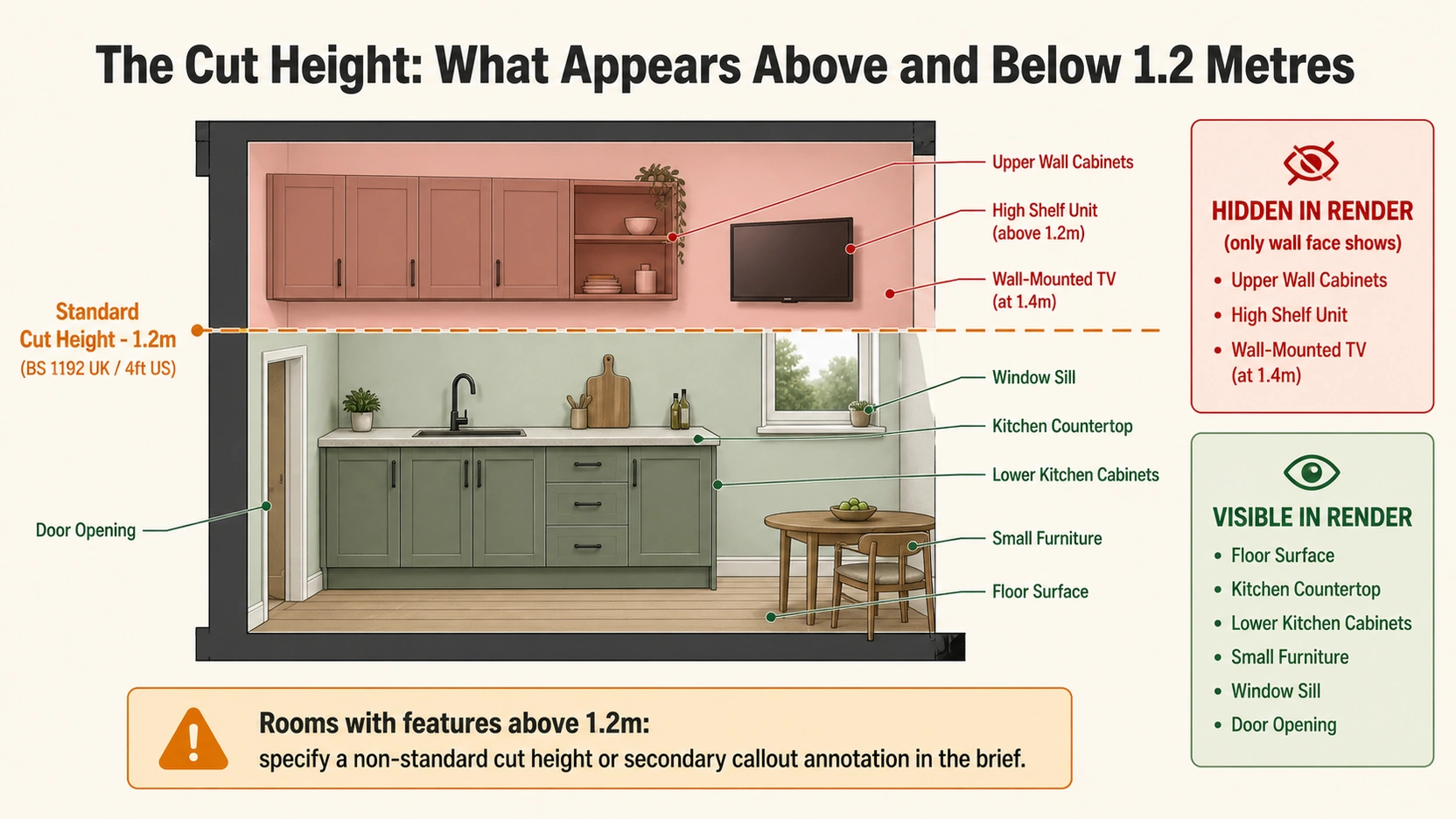
The correct approach: specify the cut height in the brief, and identify any rooms where a non-standard cut or secondary annotation is needed. Studios that do not ask about cut height in the brief are using a default that may not suit the project.
The Cut-Away Dollhouse View
A fourth variant, rarely named as a distinct type but widely produced is the cut-away or dollhouse view. The exterior walls are cut at approximately 1 metre height or removed entirely on one or two open sides. The ceiling, roof structure, and remaining walls stay in place, exposing the interior volume while showing the full room height.
The dollhouse view communicates two things that no other floor plan 3D rendering type can: ceiling height and floor-to-floor relationships. For a multi-storey townhouse or a duplex apartment, the dollhouse view shows both levels simultaneously, communicating the spatial relationship between floors that a flat floor plan cannot. For a high-ceiling loft or a double-height living room, it shows the volume that a top-down plan flattens.
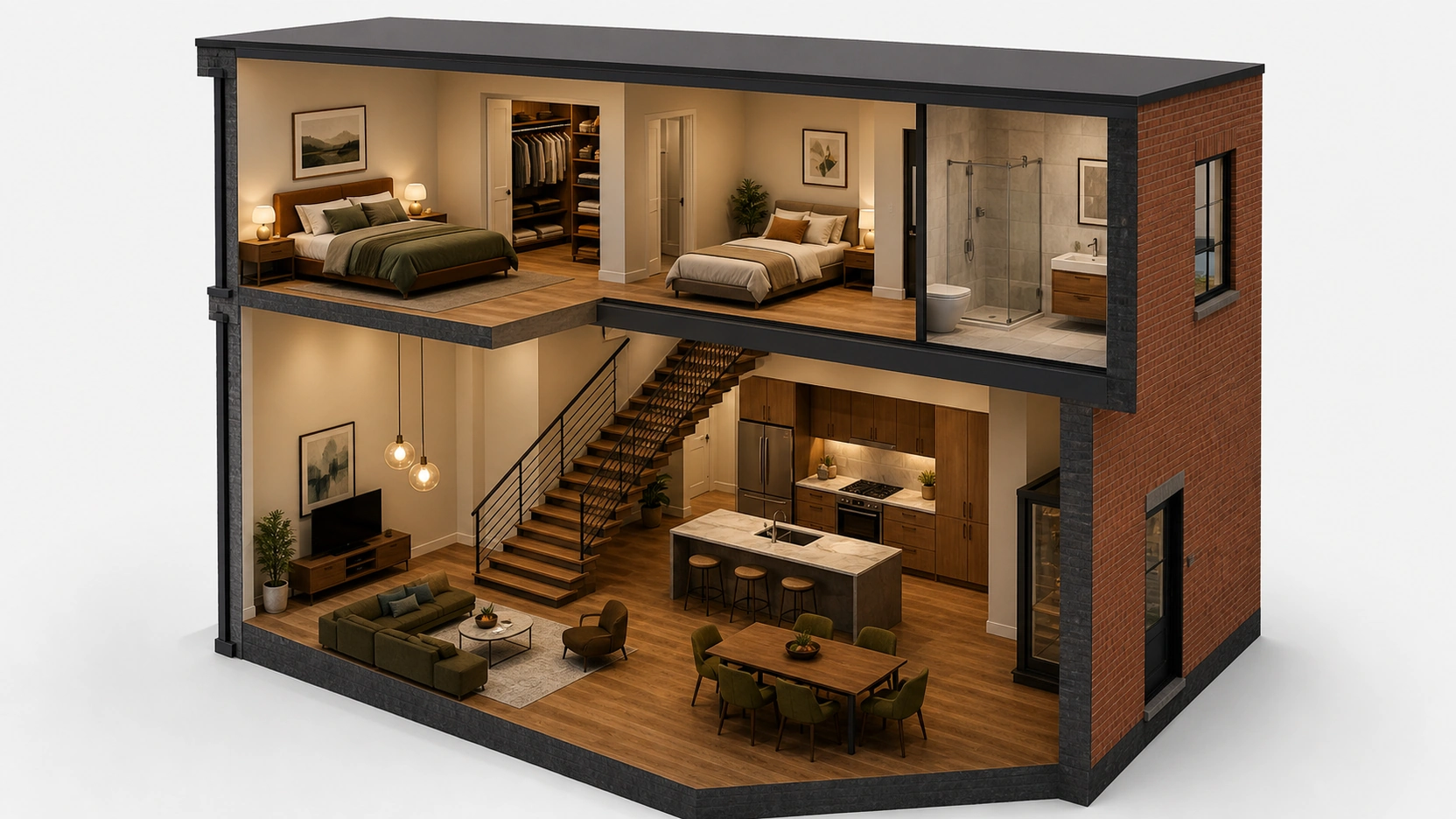
Correct uses: Multi-storey townhouses, duplex and triplex apartments, developments with notable ceiling heights (above 2.7m), interior design presentations where vertical volume is a key selling point.
Annotation Standards by View Type
The annotation conventions are different for each floor plan 3D rendering type, and they are not interchangeable.
Top-down orthographic annotations:
- Dimension lines with exact measurements (e.g. “4,200mm” or “13’9\”” in US format)
- Room area labels (e.g. “Master Bedroom 18.4 m²”)
- North arrow and scale bar
- Door swing arcs showing clearance
- Room name labels in consistent typography
Isometric and perspective 3D annotations:
- Room name labels only, no dimension lines (perspective distortion makes them visually misleading)
- Feature callouts (“Walk-in wardrobe”, “Juliet balcony”, “Open-plan kitchen / dining”)
- Compass orientation label optional
- Marketing callouts highlighting premium features
Adding technical dimension lines to a perspective 3D floor plan render is the most common briefing mistake. The perspective geometry means the same measured dimension reads differently depending on its position in the frame, a 3m wall on the near side of the room appears longer than a 3m wall on the far side. The labels become decorative rather than informative.
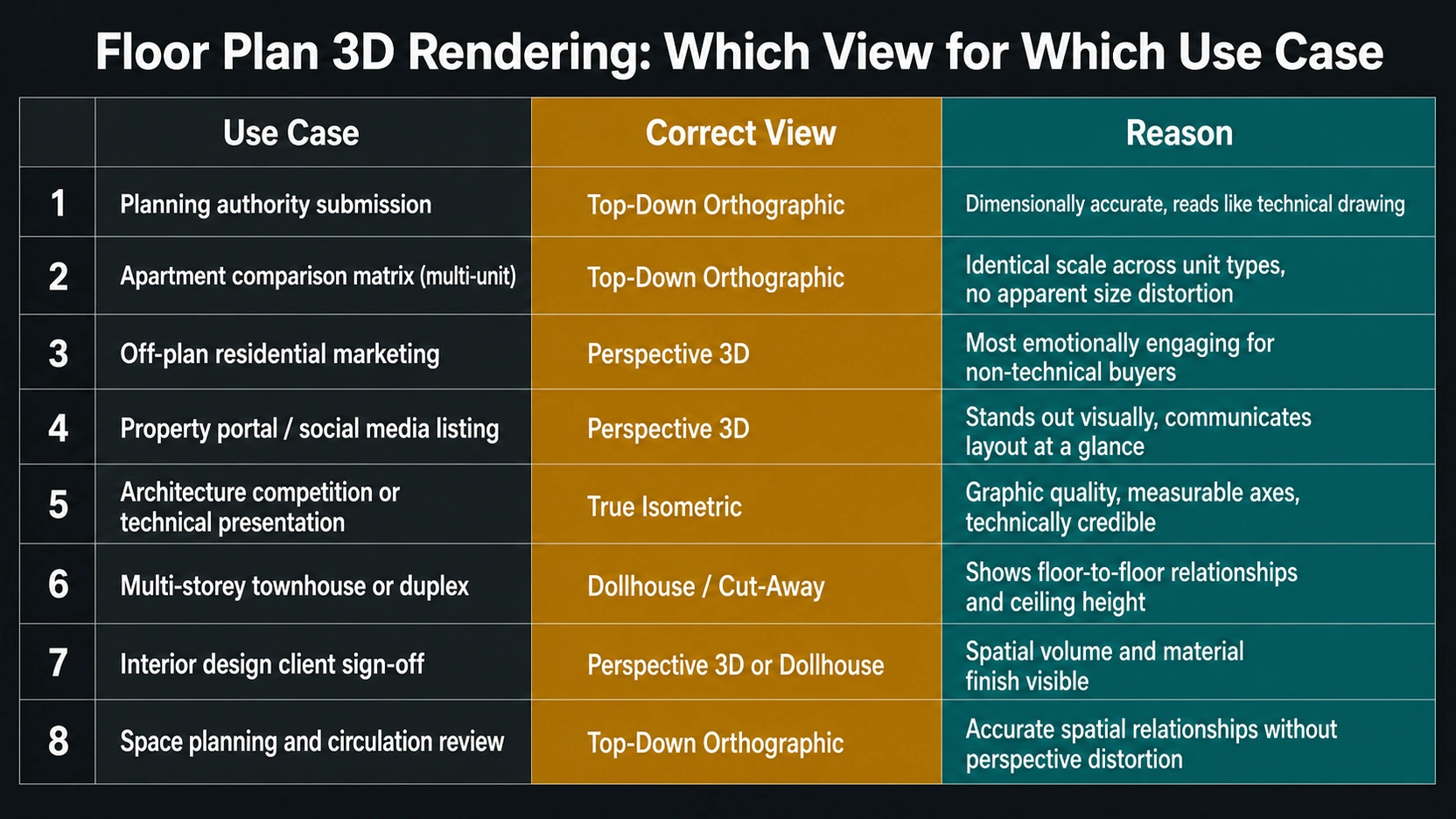
Which View for Which Use Case
| Use Case | Correct View | Reason |
|---|---|---|
| Planning authority submission | Top-Down Orthographic | Dimensionally accurate, reads like a technical drawing |
| Apartment comparison matrix (multi-unit) | Top-Down Orthographic | All units at identical scale — perspective introduces apparent size distortion |
| Off-plan residential marketing | Perspective 3D | Most emotionally engaging, lifestyle-readable for non-technical buyers |
| Property portal / social media listing | Perspective 3D | Stands out visually, communicates layout at a glance |
| Architecture competition or technical presentation | True Isometric | Graphic quality, measurable axes, technically credible |
| Multi-storey townhouse or duplex | Dollhouse / Cut-Away | Shows floor-to-floor relationships and ceiling height |
| Interior design client sign-off | Perspective 3D or Dollhouse | Spatial volume and material finish readable |
| Space planning and circulation review | Top-Down Orthographic | Accurate spatial relationships without perspective distortion |
For how floor plan 3D rendering is priced for in-house vs outsourced production at scale, see our post on 3D floor plan rendering: in-house vs outsourced cost.
For how floor plan walkthrough output compares to static renders for off-plan developer marketing, see our post on 3D floor plan walkthrough: CGI vs Matterport.
At RenderInfinity, residential floor plan 3D rendering briefs are reviewed with a cut height and annotation type question before production begins. The view type is confirmed against the intended use planning submission, marketing, or multi-unit comparison, before modelling starts. See our 3D floor plan services for current per-unit pricing and multi-unit development packages.
Key Takeaways
- Floor plan 3D rendering has three distinct view types not two. Top-down orthographic (90 degrees, dimensionally accurate), true isometric (30 degrees, parallel lines, no vanishing points), and perspective 3D (the most common market type, angled camera with vanishing points, NOT dimensionally accurate). Most studios sell perspective 3D and call it isometric.
- Every top-down orthographic floor plan 3D rendering requires a defined cut height standard is 1.2 metres above finished floor level (UK convention per BS 1192; US equivalent: 4 feet). Features above the cut disappear. Rooms with high storage, wall-mounted cabinets, or other above-cut features need a specified non-standard cut or separate callout annotation.
- The cut-away dollhouse view is a fourth widely-produced type: walls removed on one or two sides expose the interior volume and show ceiling height and floor-to-floor relationships simultaneously. Correct for multi-storey townhouses, duplexes, and high-ceiling spaces.
- Annotation standards are not interchangeable between view types. Dimension lines belong on top-down orthographic only. Adding dimension lines to a perspective 3D floor plan render makes them visually misleading perspective distortion causes apparent size differences at different depths in the frame.
- For multi-unit development marketing: top-down orthographic for the apartment comparison matrix (identical scale across unit types), perspective 3D for hero unit renders in the sales brochure and marketing suite. Using perspective 3D for the comparison matrix creates inconsistent scale perception between unit types.
Frequently Asked Questions
What is the difference between a top-down and a 3D floor plan rendering?
Top-down floor plan 3D rendering uses a camera positioned directly overhead at 90 degrees no perspective, no vanishing points. Dimensions read true to scale. It is the dimensionally accurate view type, used for planning submissions, multi-unit comparison matrices, and technical sign-off. A “3D floor plan rendering” in marketing typically means a perspective view a camera elevated at 45 to 60 degrees with a wide lens and vanishing points. This type is not dimensionally accurate but is the most visually engaging for off-plan buyers and property portal listings.
What is the standard cut height for a floor plan 3D rendering?
The standard cut height for a top-down orthographic floor plan 3D rendering is 1.2 metres above finished floor level the UK architectural convention per BS 1192, and the equivalent of 4 feet above finished floor in US practice. This captures floor surfaces, furniture, countertops, window sills, and door openings. Features above 1.2 metres wall-mounted upper cabinets, high shelving, wall-mounted TVs will not appear. For rooms with significant above-cut features, specify a higher cut height or a secondary callout annotation in the brief.
What is an isometric 3D floor plan rendering?
A true isometric floor plan 3D rendering is taken at 30 degrees from each horizontal axis. Parallel lines stay parallel, there are no vanishing points, and dimensions on the visible axes are theoretically measurable with a scale factor applied. It differs from the perspective 3D floor plan which most studios call “isometric” in their marketing, in that it has no perspective distortion. Isometric is more graphic and geometric; perspective 3D is more photographic and spatially immersive. The distinction matters if annotation accuracy or dimensional credibility is required.
Which floor plan 3D rendering type is best for off-plan property sales?
Perspective 3D is the best floor plan 3D rendering type for off-plan property sales. Its angled camera with vanishing points produces the most visually engaging and spatially readable output for non-technical buyers, furniture, material finishes, and lighting create lifestyle appeal that drives off-plan purchase decisions. Top-down orthographic is used alongside it in the same development sales suite for the apartment comparison matrix, where identical scale across unit types is needed for fair comparison. The two view types serve different functions in the same off-plan marketing package.
What is a dollhouse floor plan rendering?
A dollhouse floor plan 3D rendering (also called cut-away view) removes the exterior walls on one or two open sides while keeping the ceiling, roof structure, and remaining walls in place. This exposes the interior volume and communicates both ceiling height and floor-to-floor relationships, two things that flat top-down and perspective 3D floor plans cannot show independently. It is the correct view type for multi-storey townhouses, duplex apartments, high-ceiling loft spaces, and double-height living rooms where the vertical spatial character is a significant part of the project’s value.
Conclusion
Floor plan 3D rendering is not a single product, it is a family of three distinct view types plus the dollhouse variant, each suited to a different stage of the project and a different audience. Choosing by convention rather than by use case produces output that works well for marketing but fails for planning, or works for comparison matrices but misrepresents unit scale.